

Speech-to-Text
- Ink-2 is now multilingual — Ink 2 supports four new languages: Spanish, French, Hindi and Japanese with industry leading transcription accuracy and semantic endpointing. Try it in the playground or through the API.
Text-to-Speech
- More control over pronunciation — Pronunciation dictionaries on Sonic 3.6 now ignore case by default, so “new york,” “New York,” and “NEW YORK” share one entry. For terms where capitalization changes the meaning, turn case sensitivity on for that entry in the Playground or API. See Case sensitivity.
- Cleaner English inside Japanese and Chinese text — We improved spacing around Latin-script words in Japanese and Chinese transcripts, so Sonic 3.6 reads embedded English correctly.
- Sonic 3.6 for self-hosted deployments — The September 17 release brings self-hosted customers Sonic 3.6’s quality improvements, Odia and Urdu support, and locale-aware normalization. It also cuts stalls during voice updates. If an air-gapped license proxy goes down, you now have 24 hours to fix it instead of 5 minutes. See release details.
Voice Agents
- Personalize every call with dynamic variables — Add
{{variable}}placeholders to your agent’s instructions, greeting, and tools. Fill them in when a call starts, for each batch recipient, or mid-call from a webhook response. Every call also gets built-in variables like the caller’s number and the current time. See Dynamic variables. - Transfer calls to SIP URIs — Agents can now transfer calls to SIP URIs as well as phone numbers, and a dynamic variable can set the destination for each call (requires SIP trunking). See Transfer to number.
- Keep the conversation going while tools run — Webhook and client tools can now run in the background. Choose
immediateorasyncin a tool’s advanced settings, or setexecution_modein the API. See Execution settings. - Inactivity check-ins — If a caller goes silent, the agent checks in after 8 seconds by default. If the silence continues, it says goodbye and ends the call. You can set both timers per agent in the Playground or under
config.turnin the API. See Turn settings. - Start from a template — Create an agent from one of five ready-made templates.
- Review changes before you publish — When you publish in the Playground, you’ll see exactly what will change on live calls: prompt and greeting diffs, added or removed tools, and settings before and after. Each publish saves a version you can list and restore through the API. See Versions.
- See where your spend goes — The Voice Agents tab of the Usage dashboard now breaks spend into voice, LLM, and telephony costs. It also shows cost per call and charts calls or minutes by agent. To follow a batch campaign from start to finish, filter the call list by batch ID and start time. See List Calls.
- Claude Sonnet 5 for agents — Sonnet 5 is now in the hosted LLM catalog. Pick it in the Playground, or set the model ID to
claude-sonnet-5. See Managed LLMs.
Voices
- Your PVC carries across model upgrades — New Professional Voice Clones are now trained automatically on all eligible models, so you can switch or upgrade Cartesia TTS models and keep the same voice.
- 85 new public voices — Across 24 languages, including Hindi, Arabic, Indonesian, and Swedish.
- More multilingual voices — 58 voices in the voice library now speak up to 27 languages and accents natively.
Sonic 3.6
Sonic 3.6 is an update to Sonic 3.5 — generally available from August 27 onsonic-3.6.What’s new
- More natural speech, pacing, and emotional expression — the model adapts intonation, pacing, and emotiveness to the context of the transcript, with no SSML tags or explicit instructions. In blind head-to-head testing, listeners preferred Sonic 3.6 to Sonic 3.5 by nearly two to one on English transcripts.
- Step-change multilingual naturalness — native-sounding pronunciation and accents across 44 languages / 61 locales.
- Two new languages — Odia (
or) and Urdu (ur), including voices and IVC support. - Hindi and Hinglish transcript following — romanized and Latin-script Hindi follows the transcript accurately. Set text normalization independently of the spoken language with the new
normalizationfield — see Normalization. - Non-English alphanumerics — spelled-out letters, codes, and IDs use native letter names and accent, in all supported languages.
- In-transcript disfluencies — written disfluencies (“It’s on, uh, Fifth Street”) now shift pacing and intonation to sound like natural hesitation.
- English heteronyms — higher pronunciation accuracy on heteronyms like “read,” “bass,” and “live” in context.
How to try it
- Point your API call or Playground request at
sonic-3.6, or pin the dated snapshotsonic-3.6-2026-08-27for production traffic. - Keep your existing voice IDs, request shape, and prompting — no code changes required.
- Try it in the TTS Playground.
For customers currently using
sonic-3.5, you will have to manually repoint production traffic to sonic-3.6-2026-08-27 or sonic-3.6.What to know before you migrate
- Your voice clones carry over. Instant and Professional Voice Clones work on Sonic 3.6 with the same voice IDs — nothing to recreate. Human evals confirm voices sound the same as on Sonic 3.5.
- No changes to the feature surface. Prompting guidance, SSML tags, timestamps, codec, and speed and volume controls all behave as they do on Sonic 3.5.
Text-to-Speech
- Sharper normalization — Dates, times, and phone numbers now read correctly across every supported language, and we’ve cleaned up Japanese era years, Euro amounts, and multi-word letter spelling in Spanish and French. Currency, numbers, and units coming soon. See Prompting tips.
- Three new fields on the TTS API give you finer control over how a voice speaks:
localepicks how numbers and dates are read,accentpicks how the voice sounds, andnormalizationpicks how numbers and dates are spoken. Set only what you want to change from the default.- Locale — New optional
localefield (en-GB,es-MX,hi-IN, and 58 more). Sets what language and region the voice speaks in.languageandlocaleaccept the same values; set one, not both. Combining them returns a 400 error. - Accent — New optional
accentfield, for multilingual voices only. Sets how the voice sounds while speaking, independent of locale. See the accents field on Get Voice. - Normalization — New optional
normalizationfield:auto(default),off, or a locale code to read numbers, dates, and phone numbers in a different convention than the spoken language.
- Locale — New optional
A pinned locale code changes only the speaking convention, not the spoken language — for example,
locale: en-GB with normalization: en-US speaks British English but reads “07/03/2026” as “July third,” not “the seventh of March.” For Hinglish, pair language: hi with normalization: en-IN so numbers and dates are read in English while the voice speaks Hindi.Voices
- Better accent retention for Instant Voice Clone — On
sonic-3.6, a clone hangs on to much more of the original speaker’s accent, especially rare accents. Feed it up to 60 seconds of audio for the best results. - Make your voice multilingual — An Instant Voice Clone can now speak several languages natively, so a single voice can carry a global audience. See the multilingual voices guide.
Developer Tools
- New API version: 2026-08-14 — Cleans up multilingual voice support and drops fields that were already deprecated across the API. Existing integrations keep running unchanged on their pinned version.
Voice Agents
- Introducing Cartesia Managed Agents — Build a production voice agent without standing up a backend. You set the instructions, pick a voice and an LLM, and add the tools it needs. Cartesia runs the call on Ink and Sonic. Spin one up in the Playground or the Agents API, or walk through the Managed Agents guide.
- Hosted LLMs and built-in tools — Choose from a catalog of models Cartesia hosts, so there are no provider keys to manage. Agents can call webhook, client, and system tools to look up data, act inside your app, transfer calls, and send DTMF. LLM usage is free until October 1, 2026. See Managed LLMs.
Deprecations
- We’ll stop hosting Line SDK agents on December 1, 2026. Self-hosted agents are not affected, and existing agents keep running until that date. See migration guide.
Speech-to-Text
- Keyterm prompting for better accuracy — Set domain-specific terms, brand or product names, and rare or invented words so the model transcribes them correctly. See the keyterms guide, and try it out on the Playground or API.
- Improved Playground features — Watch transcription in real time on a sample clip or your own audio. Configure keyterms and adjust turn detection sensitivity right in the Speech-to-Text Playground.
Text-to-Speech
- Access control for voices and pronunciation dictionaries — Manage access to your custom voices and pronunciation dictionaries via the Playground or API. Set access to
publicto use them on third-party platforms.
Voice Agents
- Live agent experiences via API — Power live transcripts and keep your systems in sync with calls in real time via turn events, word-level assistant text, interruption state, tool calls, and call IDs. See the Agents WebSocket API.
- Tune noise suppression for each agent — Adjust how much noise suppression to apply to the caller’s audio.
0is off and100is max, configurable via API and in the Playground. - Track call activity in the Usage dashboard — View daily call volume and minutes and spot usage spikes alongside spend, with date range and agent filters.
Voices
- Expanded multilingual voices — 42+ voices in the voice library now speak up to 15 languages natively. Try out your favorite voice in a new language in the voice library, or retrieve its supported languages with the Get Voice API.
Developer Tools
- Manage your organization via API — Programmatically invite and manage users in your organization using your Admin API key.
- Credit usage breakdown — View and export usage by capability, model, voice, or API key on the credit usage dashboard, or pull the same data programmatically with the Get Credit Usage API.
Deprecations
- Sonic-2, Sonic-turbo, and Sonic-3-2025-10-27 will be sunsetted after October 20, 2026. Migrate to the newest stable TTS snapshot before then.
Speech-to-Text
- Turn detection controls — Adjust turn-start, turn-end, and eager-end thresholds to balance response speed against detection accuracy. See the Turn Detection guide for more details.
Text-to-Speech
- Professional Voice Clones now available on Sonic 3.5 — They deliver better speaker similarity and more stable generation than on Sonic 3, especially for rare or non-native accents.
- Test sample rates — Set any sample rate from 8 to 44.8 kHz based on your intended use case on the TTS Playground.
Voice Agents
- Upload knowledge bases — Let agents access domain-specific information via docs including FAQs, pricing, and guides. Set it up with the Knowledge Base guide.
- Batch outbound calling — Send up to 5,000 calls with a single API request. Control how many run at once, track status, retry failed calls, and schedule batches for later. See the batch calling guide.
- Zero data retention — Enable ZDR so transcripts, audio recordings, and logs from agent calls are never stored. Now available for Enterprise customers.
- Call Redaction API — Delete the transcript, audio recordings, and logs for any call on demand. The call record itself is preserved with non-sensitive operational metadata. Available via the Delete Call API.
- Smoother preview calls — Preview calls on the Playground now have lower latency and fewer dropped connections. Try calling one of your voice agents or a Cartesia voice in the voice library.
Voices
- Your most-used voices, now multilingual — 10 of our most popular voices, including Brooke and Blake, now support ~10 new languages with native-sounding accents, so you can serve global audiences with a consistent voice.
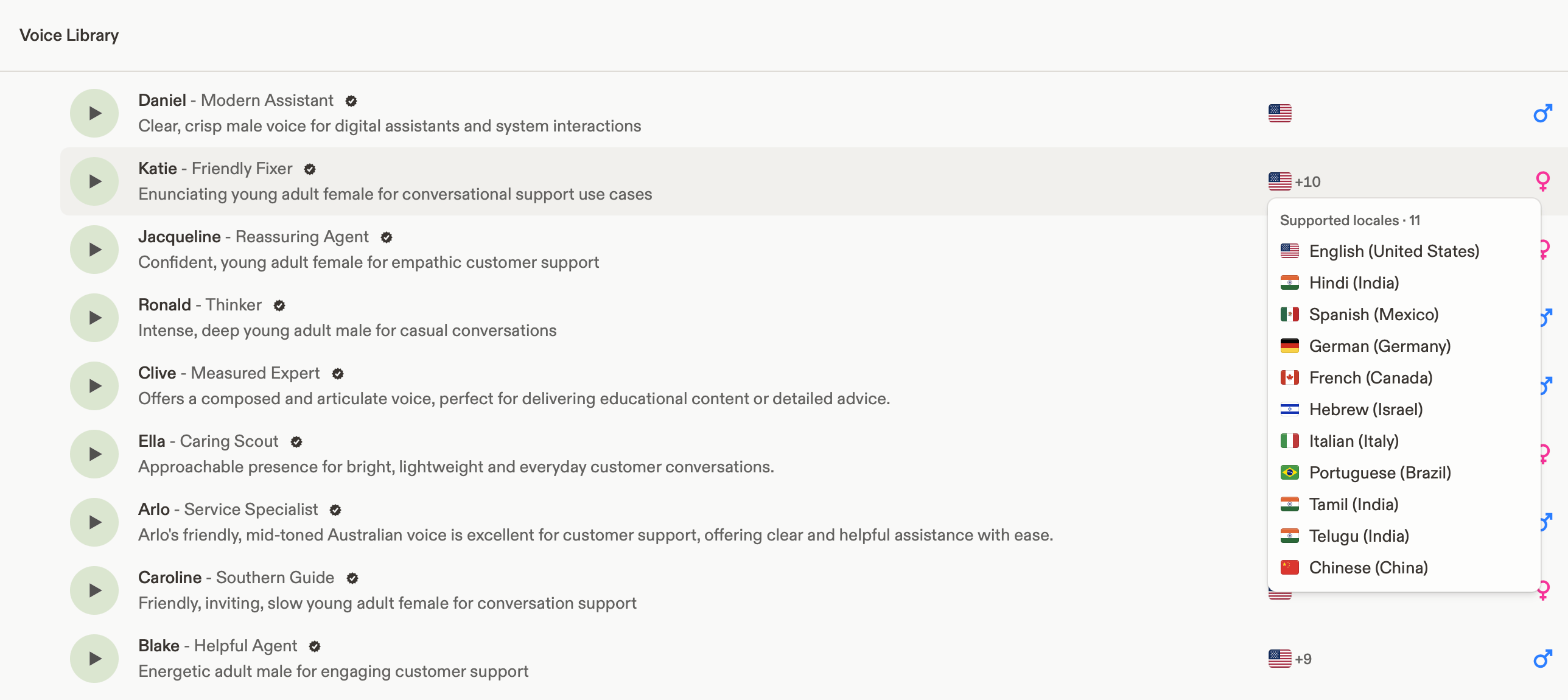
- Better localization — Localized voices now have even more natural-sounding accents across supported languages with recent updates to the localization model.
Speech-to-Text
- Ink-2, our state-of-the-art streaming STT model — Build responsive real-time voice experiences with built-in turn detection and accurate transcription even in noisy environments. It currently supports only English, with additional languages coming later.
- Try it on the Cartesia Playground.
- Integrate via API, Python, TypeScript/JavaScript, LiveKit, and PipeCat.
- Switching from Deepgram Flux? See the migration guide.
Text-to-Speech
- Sonic 3.5 is now generally available — Our most natural, expressive TTS model is out of preview and production-ready. Use the
sonic-3.5alias for the latest stable snapshot. See the Sonic 3.5 model overview.- Switching from Sonic 3? See Migrating from Sonic 3 to Sonic 3.5 for what’s new and what to check before moving production traffic.
- Speed and volume controls — Dial speed and volume up or down so voices sound the way you want. See the speed and volume guide.
Line / Agents
- More natural conversations — Eligible Line agents run on Sonic 3.5 (TTS) and Ink 2 (STT) by default, improving naturalness, pacing, latency, and turn-taking. No config change needed.
- Bring your own Twilio account — Connect your Twilio account and import your existing phone numbers. You can still use the free Cartesia-provisioned numbers included in your plan. See the Twilio integration guide.
- SIP trunking (Beta) — Connect your existing phone system directly to Cartesia’s voice agents using SIP (Session Initiation Protocol) trunking. Reach out at support@cartesia.ai for early access.
- Phone number and provider APIs — Provision, import, and configure phone numbers and providers via API. See the phone numbers API.
Voices
- Filter voices by locale — Find voices with the right accent by passing a locale (e.g.
en-GB) into the language field when listing voices. The API response now includes acountryfield (e.g.GB) to make each voice’s regional accent easier to identify. See the voices API reference. - 57 new voices across 11 locales — Added 57 new voices in the voice library, including
ar-AE,de-DE,en-CA,en-GB,en-NZ,en-US,en-ZA,es-MX,fr-CA,he-IL, andth-TH.
Sonic 3.5
Sonic 3.5 is now available onsonic-3-latest. We’d love for you to try it and tell us what you think.Why you should try it
- More natural speech, pacing, and emotional expression, especially noticeable on expressive, conversational, and support-style transcripts.
- Cleaner audio quality across all languages and voices.
- Better alphanumeric read-out — confirmation codes, order numbers, phone numbers, IDs, and emails sound meaningfully more natural, in all supported languages.
- Step-change multilingual performance, particularly Hebrew, Japanese, Spanish, Hindi, German, Korean, and French.
- English heteronyms — tricky English heteronyms like “read,” “bass,” and “bow” now pronounce correctly in context.
How to try it
- Point your API call or Playground request to the model ID
sonic-3-latest. - Keep your existing voice IDs, request shape, and prompting — no code changes required for most customers.
- Send us feedback on any voice or transcript that behaves differently than you expect.
As with any
-latest alias, sonic-3-latest can be updated without notice and is not recommended for production. Pin to a dated snapshot (e.g. sonic-3) for production traffic.What to know to be successful
- Spell tags still work the same way. If you already wrap alphanumerics in
<spell>...</spell>, you don’t need to change anything — you’ll just get better-sounding output. See Prompting Tips for more details. - If you use custom delimiters (commas/periods between characters or groups) to control pacing, our recommended format has changed. Use spaces between characters and commas between groups, e.g.
A B C, 1 2 3instead ofA, B, C. 1, 2, 3.. See Prompting Tips for more details. - Speed and volume controls are temporarily disabled on
sonic-3-latest. If you rely on speed or volume augmentation (including via SSML), stay onsonic-3for now. We believe that Sonic 3.5 has more natural pacing and you may find that you don’t need to use speed control as much when using this model. - Timestamps behave slightly differently. If you use end-of-word timestamps for interruption handling, you should not see a meaningful change. If you depend on beginning-of-word timestamps, please test carefully and reach out if you see regressions for your use case.
- Existing Professional Voice Clones (PVCs) do not carry over to
sonic-3-latest. Professional Voice Clones are pinned to the base model they were trained on (e.g.sonic-3) and will function as a standard voice clone for this model. For more information, see Pro Voice Clone. - Providing proper context to the model improves naturalness. Please see our buffering guide here for more details.
Where to look for help
API
- Usage and API keys — New HTTP APIs for usage and API keys.
- Speech-to-text (STT) — Improved documentation. See STT streaming.
Playground
- Improved call details experience — Click on a transcript to seek audio when reviewing calls.
- Cancel call — You can now cancel active calls from the Playground, for example, if you mistakenly made outbound calls.
- Keys — One Keys screen with Standard and Admin tabs when your org has access.
- Pronunciation dictionaries — In-app list and detail views for dictionaries tied to your organization.
Line / Agents
- LLM provider — Agent inference paths standardize on Anthropic; setup copy and defaults no longer point voice agents at Gemini keys.
- OpenAI WebSocket mode — We now support OpenAI’s WebSocket mode, which offers low latency for agent inference.
- Transfer and end call interruption — In the Line SDK, you can set transfer and end call as uninterruptible.
Models / Voices
- Voice Library — 34 new voices across 10 locales (
ar-001,de-DE,en-US,en-AU,he-IL,hi-IN,ko-KR,tl-PH,ta-IN,te-IN). - Voice cloning — More reliable uploads for M4A (and similar) source clips when creating clones.
Self-hosted
- Playground — Add voices to your on-prem deployment.
- Pronunciation dictionaries —
POST /onprem/add-pdictto import dictionaries from cloud into self-hosted stacks. - STT — Optional streaming STT via your configured provider integration in self-hosted environments.
Breaking
- Text-to-Agent (T2A) API — Text-to-Agent workflow for Line is deprecated.
API
- Error responses — For
Cartesia-Version: 2026-03-01, we now return structured JSON. See API Errors.- API versions before
2026-03-01continue to return legacy error formats (for example HTTPTitle: Message). - Voices —
PATCH /voices/{id}: voice owners can now update accent and gender. Voice creation validates language. Invalid voice UUIDs and pronunciation-dictionary IDs return 404 instead of ambiguous errors.
- API versions before
- PVC model routing — PVC voices require a dated model ID (e.g.
sonic-3-2026-01-12) instead ofsonic-3. See Pro Voice Clone. - Voice search — Name and metadata search is diacritics-insensitive.
Playground
- Pro voice clones
- Clearer language mismatch messaging
- Background noise removal is now a simple on/off control
- Fine-tuning model support:
- Removed support for older models
- Now only sonic-3-2026-01-12 is supported
- Multilingual agents — Multilingual agent configuration is now supported in the Playground.
- Agents UI — Search by call ID and agent ID.
Billing
- Concurrency — Organizations can receive notifications when concurrency nears configured limits.
Model / voice
- Professional Voice Clones — Backend updates improve stability of the professional voice cloning workflow.
- Accents & filters — Additional accent options (e.g. Irish, New Zealand, South African, Belgian) and locale aliases for accent filtering in APIs and Playground.
- Voice Library — 94 new voices across 17 locales (including Arabic, German, English variants, Spanish, Finnish, French, Hebrew, Hindi, Japanese, Korean, Polish, Portuguese, Swedish, Telugu, Thai, and more).
Self-hosted
- On-premises — API for managing voices on self-hosted deployments.
Cartesia SDK
-
cartesia-js v3.0.0 (Mar 2) — Major updates:
- New features:
flush_idincluded in chunk and voice changer binary responses;output_formatand infill support; inline WebSocket response types; byte endpoint returns ArrayBuffer; improved WebPlayer and client export. - Fixes: memory leak and timing issues with abort signals/listeners, handling of empty
Content-Length, and TimeoutError now includes a message.
- New features:
Line
- History Management API: You can add or replace the history provided to your agent, for example, to summarize a long conversation.
- Custom User Events: You can send bidirectional custom events between your client and the agent. You could use this, for example, if you have a web application with UI interactions.
- Uninterruptible Messages: You can set messages as uninterruptible. A common use case is a legal disclaimer at the beginning of a call.
- End Tool Call Improvements: The default end call tool call is more conservative to prevent calls from ending prematurely.
API
- Increased reliability of API connections
Cartesia SDK
- cartesia-python v3.0.0 (Feb 9). See full details in cartesia-python releases.
Playground
- Shipped a new TTS page
- Shipped a new Voice Creation page
- Shipped a new Agents page
Model changes
- Improved pronunciation of real-world text patterns across languages
- Enhanced support for structured and formatted speech patterns: numbers, dates, times, currency, phone numbers, IDs, percentages, and amounts/measurements.
- Support for various date formats (YYYY-MM-DD, YYYY/MM/DD, 年月日).
- Support for measurement units (meters, kg, tablespoon, gigabytes, etc.) with locale awareness.
- Support for domestic and international phone number formats with locale-specific chunking for French, Italian, German, Portuguese, Korean, and more.
- Improved alphanumeric ID handling with katakana/hiragana readings and Latin acronym transliteration to katakana for Japanese.
- Improves all languages except English, Hindi & other Indic languages, Arabic, Hebrew, Chinese, Swedish, Georgian, Bulgarian, and Tagalog (targeted for future updates).
- Support for regional and locale-specific pronunciation within languages
- Regional voices use region-specific terms in addition to accent (e.g. Belgian and Swiss French “nonante” vs. Canadian and French “quatre-vingt-dix”).
- Region-specific number terminology, currency symbols, date formats, and measurement units.
- Locale-aware date and time formatting (e.g. Russian year suffixes, French/Spanish time conventions).
- Locale-aware currency symbol handling (e.g. $ as “dollars” in en_US and “pesos” in es_MX).
- Locale pronunciation falls back to the primary country for that language (e.g. US for English, Brazil for Portuguese). We will continue to expand locale-aware support.
- Improves all languages except English, Hindi & other Indic languages, Arabic, Hebrew, Chinese, Swedish, Georgian, Bulgarian, and Tagalog (targeted for future updates). Existing regional pronunciation for English voices (e.g. British) is unaffected.
Voice changes
- Voice Library: 39 new voices across 21 locales
Breaking changes effective June 1, 2026
The following model snapshots and languages are discontinued effective June 1, 2026:The following endpoints are discontinued effective June 1, 2026:
The following endpoints stop accepting voice embeddings effective June 1, 2026:
API
- Regionalization — Calls routed to US, EU, APAC by origin.
- Parameterized outbound calls — Docs
- Pronunciation dictionaries — Docs
Model changes
- Sonic-3 model versioning scheme introduced
- New preview track:
sonic-3-latest(continuous updates for early access and feedback). - Stable track:
sonic-3always points to the most recent stable release. - Immutable dated snapshots:
sonic-3-YYYY-MM-DDnever change. - Details: Continuous updates and model snapshots
- New preview track:
- Promotion to stable checkpoint:
sonic-3-2026-01-12- Included improvements: consistent speed & volume, custom IPA pronunciations with stronger adherence, Hindi prosody improvements, Korean prosody/intonation improvements.
Voice changes
- Featured Voices launched — Curated set of 30+ best-performing voices (e.g. Cathy, Henry).
- Voice Library — December: 25 new voices across 6 languages.
- Voice Library — January: 9 Spanish voices (Mexican, Colombian, Castilian).
Playground
- Voice library usability improvements (test with your own scripts, call an agent per voice).
- One-click Report Issue on TTS Playground.
- Mini voice picker (recently used + saved) on TTS page.
- PVC UI + reliability (loading skeletons, error messages, better behavior with large datasets and silence).
Line
- Line SDK v0.2 — Repo. Improved DX, long-running tool-call handling, committed turns, better turn-taking and transcription.