

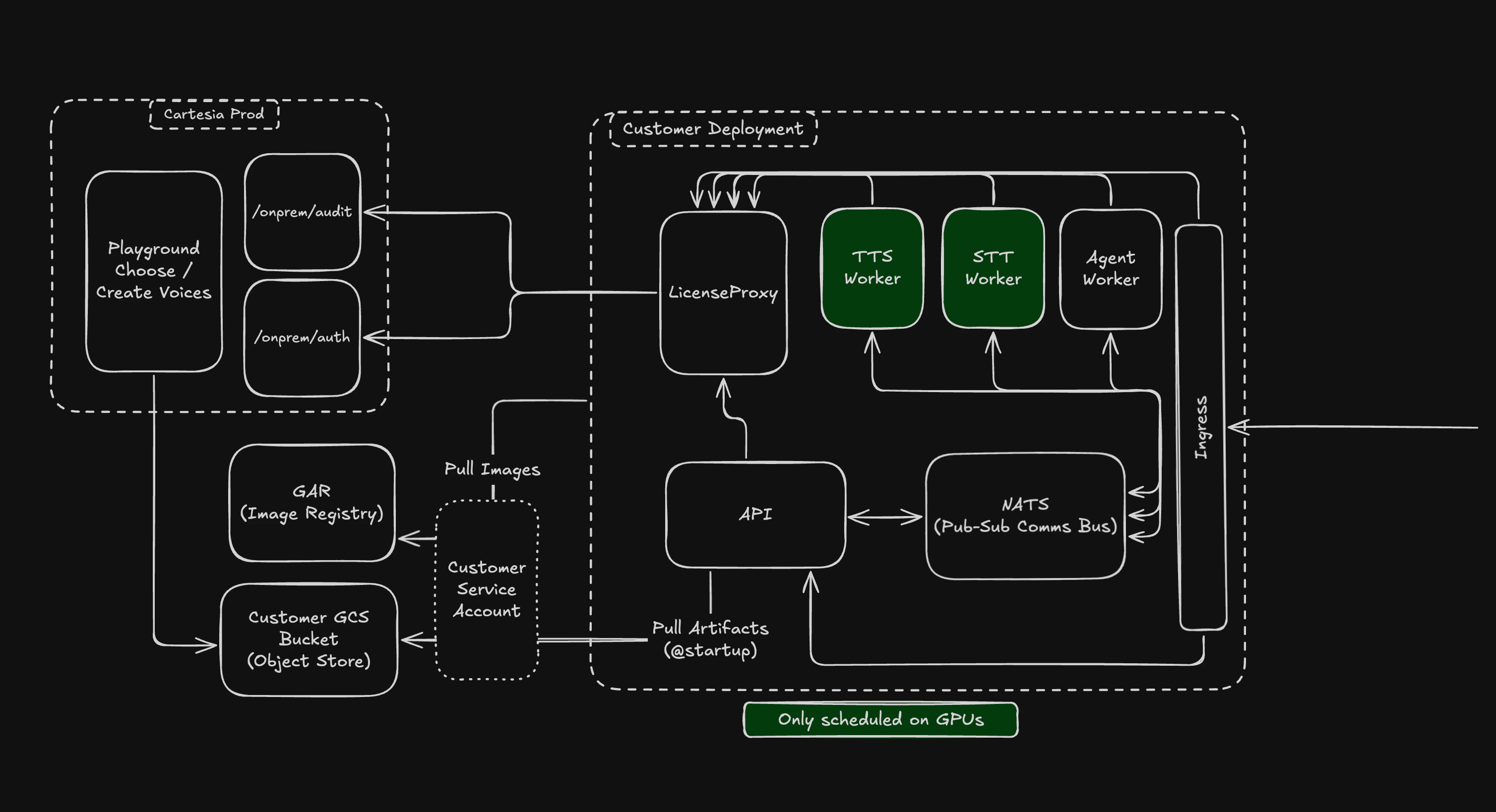
High level architecture for Cartesia self-hosted.
Core Components
API Server
The API Server is the entrypoint for all requests for your self-hosted Cartesia Service. It handles incoming REST API requests and WebSocket connections.PubSub Controller (NATS)
We leverage an async communication protocol between the API server and the model containers to manage smooth low latency request handling. This design allows :- Model containers to leave and join the cluster freely.
- Efficient stateful management of long running request lifecycles.
- Coordination between the API server and Model containers for the lowest latency pathways for a request.
Model Workers (Engine)
Cartesia provides batched engine workers for both TTS and STT. The core parameter to customize here is thebatch_size (B). We’ll discuss tradeoffs
for this and other parameters in the Performance Tuning sections.
License Proxy Server
We deploy a single service which talks to our cloud environment for authenticating and ensuring license validity of the self-hosted deployment. We do this for several reasons, primarily: this becomes the only service making outbound calls, thus making it easier to configure network security policies. Proxy allows you to choose the level of isolation you want:Connected: The deployment validates licensing by pinging our cloud periodically and sends telemetry regarding usage.Air-gapped: Completely isolated offering, where you work with an offline license. In air-gapped mode, we work with you directly to get usage information via audit-logs.
Connected mode, however if you have need for completely isolated deployments,
our GTM team can work with you in setting things up.
For both Connected and Air-gapped mode, we have grace periods configured, so we don’t immediately terminate the operations on getting disconnected or license expiring.
Network Topology and Ports
The values below are sourced from the Helm chart shipped incartesia-kube.
Inter-service ports
Service-to-service traffic
Outbound egress (Connected mode)
In connected mode, the cluster needs outbound access to these destinations. Allowlist them in your firewall:
In air-gapped mode, none of these egress paths are required — the cluster operates entirely offline against a locally-issued license file.
Restricting cluster egress
The Helm chart ships an opt-inNetworkPolicy that blocks all non-cluster egress except DNS, RFC1918 private ranges (10.0.0.0/8, 172.16.0.0/12, 192.168.0.0/16), and the cloud-metadata IP (169.254.169.254/32). Enable in values.yaml:
Traffic between services
All inter-service communication inside the cluster is unencrypted. Access to the cluster network is restricted by your cloud provider’s networking and anyNetworkPolicy resources you apply. The chart ships an opt-in policy that blocks all non-cluster egress (see Restricting cluster egress above).
For ingress TLS configuration (ACM on EKS, Managed Certificates on GKE, BYO certs on self-managed clusters), see Managed Kubernetes.