> ## Documentation Index
> Fetch the complete documentation index at: https://docs.cartesia.ai/llms.txt
> Use this file to discover all available pages before exploring further.
# Architecture
> Overview of the core components in a Cartesia self-hosted deployment.
Cartesia's self-hosted services support a configurable trade-off between latency and throughput for both TTS and STT deployments.
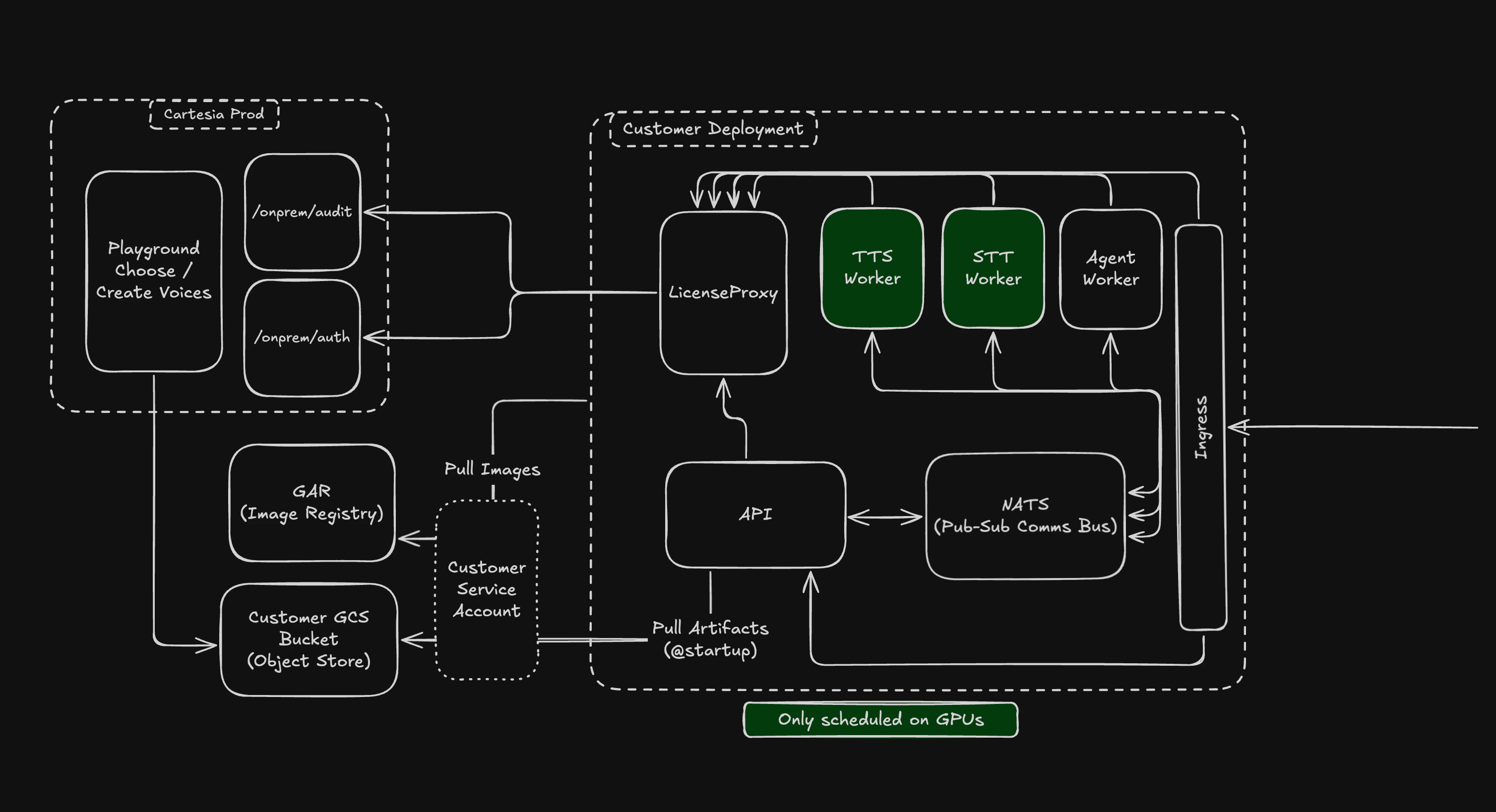 ## Core Components
### API Server
The API Server is the entrypoint for all requests for your self-hosted Cartesia Service. It handles incoming REST API requests and WebSocket connections.
### PubSub Controller (NATS)
We leverage an async communication protocol between the API server and the model containers to manage smooth low latency request handling. This design allows :
* Model containers to leave and join the cluster freely.
* Efficient stateful management of long running request lifecycles.
* Coordination between the API server and Model containers for the lowest latency pathways for a request.
### Model Workers (Engine)
Cartesia provides batched engine workers for both TTS and STT. The core parameter to customize here is the `batch_size (B)`. We'll discuss tradeoffs
for this and other parameters in the Performance Tuning sections.
### License Proxy Server
We deploy a single service which talks to our cloud environment for authenticating and ensuring license validity of the self-hosted deployment. We
do this for several reasons, primarily: this becomes the only service making outbound calls, thus making it easier to configure network security
policies.
Proxy allows you to choose the level of isolation you want:
* `Connected`: The deployment validates licensing by pinging our cloud periodically and sends telemetry regarding usage.
* `Air-gapped`: Completely isolated offering, where you work with an offline license. In air-gapped mode, we work with you directly to get usage
information via audit-logs.
For most customers, we recommend deploying in `Connected` mode, however if you have need for completely isolated deployments,
our GTM team can work with you in setting things up.
For both `Connected` and `Air-gapped` mode, we have grace periods configured, so we don't immediately terminate the operations on getting disconnected or license expiring.
## Network Topology and Ports
The values below are sourced from the Helm chart shipped in `cartesia-kube`.
### Inter-service ports
| Component | Port | Protocol |
| --------------- | ------ | ------------------- |
| API server | `5000` | HTTP / WebSocket |
| API metrics | `8080` | HTTP (Prometheus) |
| NATS | `4222` | NATS protocol (TCP) |
| NATS monitoring | `8222` | HTTP |
| License proxy | `8080` | HTTP |
| Worker metrics | `8080` | HTTP (Prometheus) |
### Service-to-service traffic
| From | To | Purpose |
| --------------- | ------------------------------------------ | --------------------------------------------------------------------- |
| Client | Ingress → API `5000` | REST and WebSocket requests |
| API | NATS `4222` | Publishes TTS and STT jobs |
| API | License proxy `8080` (`LICENSE_PROXY_URL`) | Per-request authorization check |
| Workers | NATS `4222` | Subscribe to inference jobs |
| License proxy | Cartesia license endpoint | Auth and audit log forwarding (air-gapped mode performs both locally) |
| API and Workers | Google Cloud Storage | Voice, LoRA, and migration sync |
| Prometheus | API `8080`, Worker `8080` | Metrics scrape every 5 seconds |
### Outbound egress (Connected mode)
In connected mode, the cluster needs outbound access to these destinations. Allowlist them in your firewall:
| Destination | Port | Reason |
| ------------------------ | -------------- | --------------------------------------------- |
| `us-docker.pkg.dev` | 443 | Container image pulls on pod start |
| `storage.googleapis.com` | 443 | Voice, LoRA, and migration sync from GCS |
| `api.cartesia.ai` | 443 | License-proxy authentication (connected mode) |
| DNS | 53 (UDP + TCP) | Standard resolution |
In [air-gapped mode](/self-hosted/air-gapped), none of these egress paths are required — the cluster operates entirely offline against a locally-issued license file.
### Restricting cluster egress
The Helm chart ships an opt-in `NetworkPolicy` that blocks all non-cluster egress except DNS, RFC1918 private ranges (`10.0.0.0/8`, `172.16.0.0/12`, `192.168.0.0/16`), and the cloud-metadata IP (`169.254.169.254/32`). Enable in `values.yaml`:
```yaml theme={null}
networkPolicy:
denyExternalEgress: true
```
Use this when you mediate all internet egress through a separate gateway, or in air-gapped deployments.
## Traffic between services
All inter-service communication inside the cluster is unencrypted.
Access to the cluster network is restricted by your cloud provider's networking and any `NetworkPolicy` resources you apply. The chart ships an opt-in policy that blocks all non-cluster egress (see [Restricting cluster egress](#restricting-cluster-egress) above).
For ingress TLS configuration (ACM on EKS, Managed Certificates on GKE, BYO certs on self-managed clusters), see [Managed Kubernetes](/self-hosted/managed-kubernetes).
## Core Components
### API Server
The API Server is the entrypoint for all requests for your self-hosted Cartesia Service. It handles incoming REST API requests and WebSocket connections.
### PubSub Controller (NATS)
We leverage an async communication protocol between the API server and the model containers to manage smooth low latency request handling. This design allows :
* Model containers to leave and join the cluster freely.
* Efficient stateful management of long running request lifecycles.
* Coordination between the API server and Model containers for the lowest latency pathways for a request.
### Model Workers (Engine)
Cartesia provides batched engine workers for both TTS and STT. The core parameter to customize here is the `batch_size (B)`. We'll discuss tradeoffs
for this and other parameters in the Performance Tuning sections.
### License Proxy Server
We deploy a single service which talks to our cloud environment for authenticating and ensuring license validity of the self-hosted deployment. We
do this for several reasons, primarily: this becomes the only service making outbound calls, thus making it easier to configure network security
policies.
Proxy allows you to choose the level of isolation you want:
* `Connected`: The deployment validates licensing by pinging our cloud periodically and sends telemetry regarding usage.
* `Air-gapped`: Completely isolated offering, where you work with an offline license. In air-gapped mode, we work with you directly to get usage
information via audit-logs.
For most customers, we recommend deploying in `Connected` mode, however if you have need for completely isolated deployments,
our GTM team can work with you in setting things up.
For both `Connected` and `Air-gapped` mode, we have grace periods configured, so we don't immediately terminate the operations on getting disconnected or license expiring.
## Network Topology and Ports
The values below are sourced from the Helm chart shipped in `cartesia-kube`.
### Inter-service ports
| Component | Port | Protocol |
| --------------- | ------ | ------------------- |
| API server | `5000` | HTTP / WebSocket |
| API metrics | `8080` | HTTP (Prometheus) |
| NATS | `4222` | NATS protocol (TCP) |
| NATS monitoring | `8222` | HTTP |
| License proxy | `8080` | HTTP |
| Worker metrics | `8080` | HTTP (Prometheus) |
### Service-to-service traffic
| From | To | Purpose |
| --------------- | ------------------------------------------ | --------------------------------------------------------------------- |
| Client | Ingress → API `5000` | REST and WebSocket requests |
| API | NATS `4222` | Publishes TTS and STT jobs |
| API | License proxy `8080` (`LICENSE_PROXY_URL`) | Per-request authorization check |
| Workers | NATS `4222` | Subscribe to inference jobs |
| License proxy | Cartesia license endpoint | Auth and audit log forwarding (air-gapped mode performs both locally) |
| API and Workers | Google Cloud Storage | Voice, LoRA, and migration sync |
| Prometheus | API `8080`, Worker `8080` | Metrics scrape every 5 seconds |
### Outbound egress (Connected mode)
In connected mode, the cluster needs outbound access to these destinations. Allowlist them in your firewall:
| Destination | Port | Reason |
| ------------------------ | -------------- | --------------------------------------------- |
| `us-docker.pkg.dev` | 443 | Container image pulls on pod start |
| `storage.googleapis.com` | 443 | Voice, LoRA, and migration sync from GCS |
| `api.cartesia.ai` | 443 | License-proxy authentication (connected mode) |
| DNS | 53 (UDP + TCP) | Standard resolution |
In [air-gapped mode](/self-hosted/air-gapped), none of these egress paths are required — the cluster operates entirely offline against a locally-issued license file.
### Restricting cluster egress
The Helm chart ships an opt-in `NetworkPolicy` that blocks all non-cluster egress except DNS, RFC1918 private ranges (`10.0.0.0/8`, `172.16.0.0/12`, `192.168.0.0/16`), and the cloud-metadata IP (`169.254.169.254/32`). Enable in `values.yaml`:
```yaml theme={null}
networkPolicy:
denyExternalEgress: true
```
Use this when you mediate all internet egress through a separate gateway, or in air-gapped deployments.
## Traffic between services
All inter-service communication inside the cluster is unencrypted.
Access to the cluster network is restricted by your cloud provider's networking and any `NetworkPolicy` resources you apply. The chart ships an opt-in policy that blocks all non-cluster egress (see [Restricting cluster egress](#restricting-cluster-egress) above).
For ingress TLS configuration (ACM on EKS, Managed Certificates on GKE, BYO certs on self-managed clusters), see [Managed Kubernetes](/self-hosted/managed-kubernetes).