> ## Documentation Index
> Fetch the complete documentation index at: https://docs.cartesia.ai/llms.txt
> Use this file to discover all available pages before exploring further.
# Phone Numbers
> Connect phone numbers to your voice agents for inbound and outbound calling.
Cartesia supports two ways to connect phone numbers to your agents: Cartesia-provisioned numbers and Twilio (bring your own) numbers.
| Feature | Cartesia Numbers | Twilio Numbers |
| ---------------------- | ---------------- | -------------------------------------------------------------------- |
| Number origin | US only | Any country available in Twilio |
| Inbound calls | ✓ | ✓ |
| Outbound to US | ✓ | ✓ |
| Outbound international | ✗ | ✓ (at your Twilio cost) |
| Regional routing | N/A | [Configurable](/line/integrations/telephony/twilio/regional-routing) |
| Provisioning | Automatic | Import from Twilio |
| Cost | Included in plan | Your Twilio usage rates |
## Cartesia Numbers
Cartesia provisions US phone numbers tied to your subscription plan. Provision numbers from the Playground or via the API and assign them to agents immediately.
See the [Cartesia Numbers guide](/line/integrations/telephony/cartesia-numbers) for setup and management.
## Twilio Numbers (Bring Your Own)
Import phone numbers from your Twilio account for full international support, including inbound and outbound calling to any destination supported by Twilio.
See the [Twilio Integration guide](/line/integrations/telephony/twilio/integration) for step-by-step setup.
## Managing Numbers
View and manage all your phone numbers — both Cartesia and Twilio — in the [Phone Numbers dashboard](https://play.cartesia.ai/phone-numbers), via the [Phone Numbers API](/api-reference/agents/phone-numbers/list), or with the [CLI](/line/cli#phone-numbers).
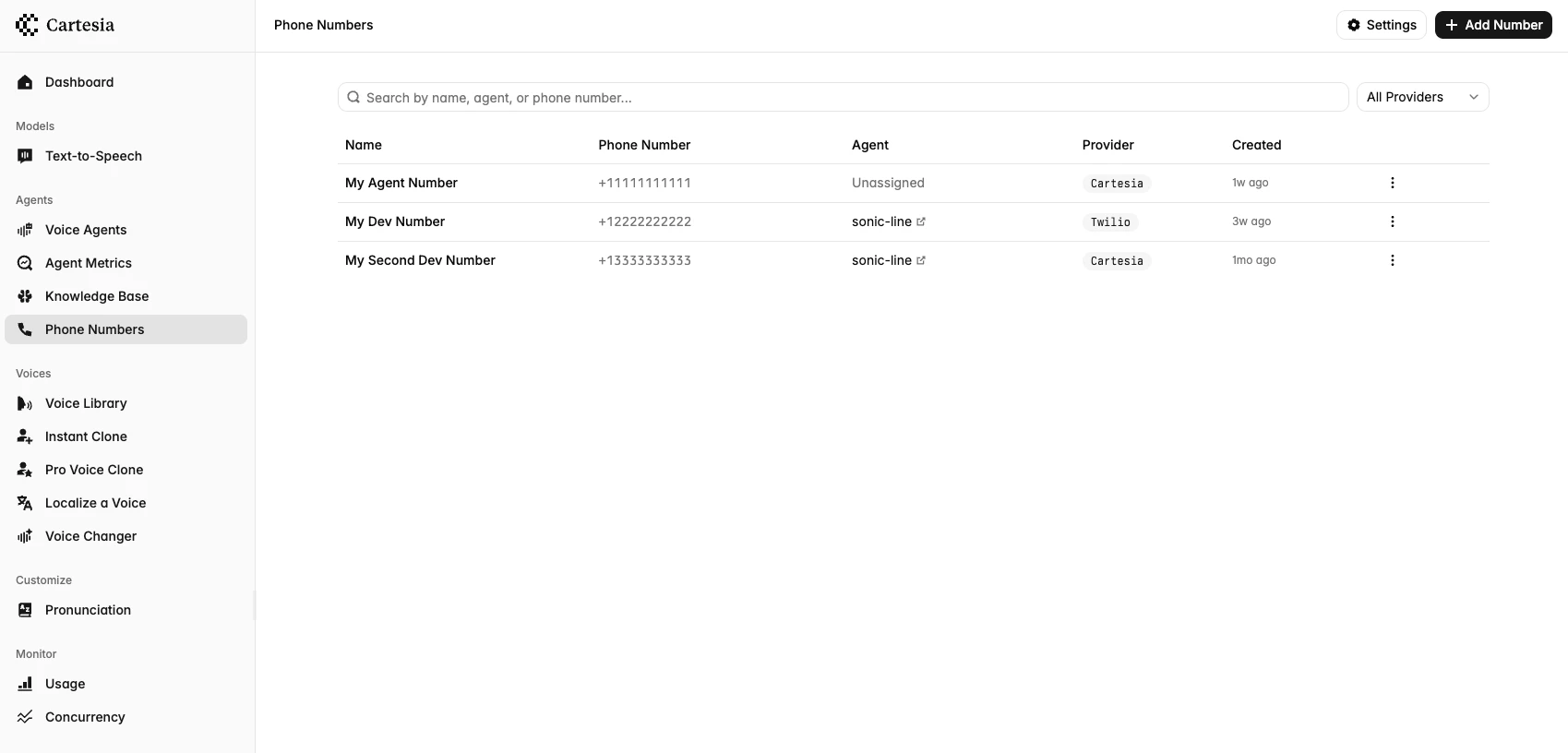 List all phone numbers from the CLI:
```zsh lines theme={null}
cartesia phone-numbers ls
```
Filter by provider type or agent:
```zsh lines theme={null}
cartesia phone-numbers ls --type twilio
cartesia phone-numbers ls --agent-id
```
### Assigning an Inbound Agent
Assigning a phone number to an agent routes **inbound calls** on that number to the agent. A number can only be assigned to one agent at a time, but an agent can have multiple numbers route to it.
1. Click on a phone number to open its detail page
2. In the **Agent** card, search for and select your agent
```zsh lines theme={null}
cartesia phone-numbers assign --agent-id
```
To unassign a number from its agent:
```zsh lines theme={null}
cartesia phone-numbers unassign
```
```bash theme={null}
curl -X PATCH "https://api.cartesia.ai/agents/phone-numbers/YOUR_PHONE_NUMBER_ID" \
-H "Authorization: Bearer $CARTESIA_API_KEY" \
-H "Content-Type: application/json" \
-H "Cartesia-Version: 2026-03-01" \
-d '{
"agent_id": "YOUR_AGENT_ID"
}'
```
To unassign, set `agent_id` to `null`.
### Outbound-only numbers
Import or provision a number, and then pass its ID as `from_number_id` when placing outbound calls.
```bash theme={null}
curl -X POST "https://api.cartesia.ai/agents/calls" \
-H "X-API-Key: $CARTESIA_API_KEY" \
-H "Cartesia-Version: 2026-03-01" \
-H "Content-Type: application/json" \
-d '{
"from_number_id": "YOUR_PHONE_NUMBER_ID",
"agent_id": "YOUR_AGENT_ID",
"outbound_calls": [{ "to_number": "+14155559876" }]
}'
```
See [Outbound Calling](/line/integrations/telephony/outbound-dialing) for the full request reference.
List all phone numbers from the CLI:
```zsh lines theme={null}
cartesia phone-numbers ls
```
Filter by provider type or agent:
```zsh lines theme={null}
cartesia phone-numbers ls --type twilio
cartesia phone-numbers ls --agent-id
```
### Assigning an Inbound Agent
Assigning a phone number to an agent routes **inbound calls** on that number to the agent. A number can only be assigned to one agent at a time, but an agent can have multiple numbers route to it.
1. Click on a phone number to open its detail page
2. In the **Agent** card, search for and select your agent
```zsh lines theme={null}
cartesia phone-numbers assign --agent-id
```
To unassign a number from its agent:
```zsh lines theme={null}
cartesia phone-numbers unassign
```
```bash theme={null}
curl -X PATCH "https://api.cartesia.ai/agents/phone-numbers/YOUR_PHONE_NUMBER_ID" \
-H "Authorization: Bearer $CARTESIA_API_KEY" \
-H "Content-Type: application/json" \
-H "Cartesia-Version: 2026-03-01" \
-d '{
"agent_id": "YOUR_AGENT_ID"
}'
```
To unassign, set `agent_id` to `null`.
### Outbound-only numbers
Import or provision a number, and then pass its ID as `from_number_id` when placing outbound calls.
```bash theme={null}
curl -X POST "https://api.cartesia.ai/agents/calls" \
-H "X-API-Key: $CARTESIA_API_KEY" \
-H "Cartesia-Version: 2026-03-01" \
-H "Content-Type: application/json" \
-d '{
"from_number_id": "YOUR_PHONE_NUMBER_ID",
"agent_id": "YOUR_AGENT_ID",
"outbound_calls": [{ "to_number": "+14155559876" }]
}'
```
See [Outbound Calling](/line/integrations/telephony/outbound-dialing) for the full request reference.