> ## Documentation Index
> Fetch the complete documentation index at: https://docs.cartesia.ai/llms.txt
> Use this file to discover all available pages before exploring further.
# Observability
> Get full visibility into how your Agent is performing.
Monitor every deployment and call.
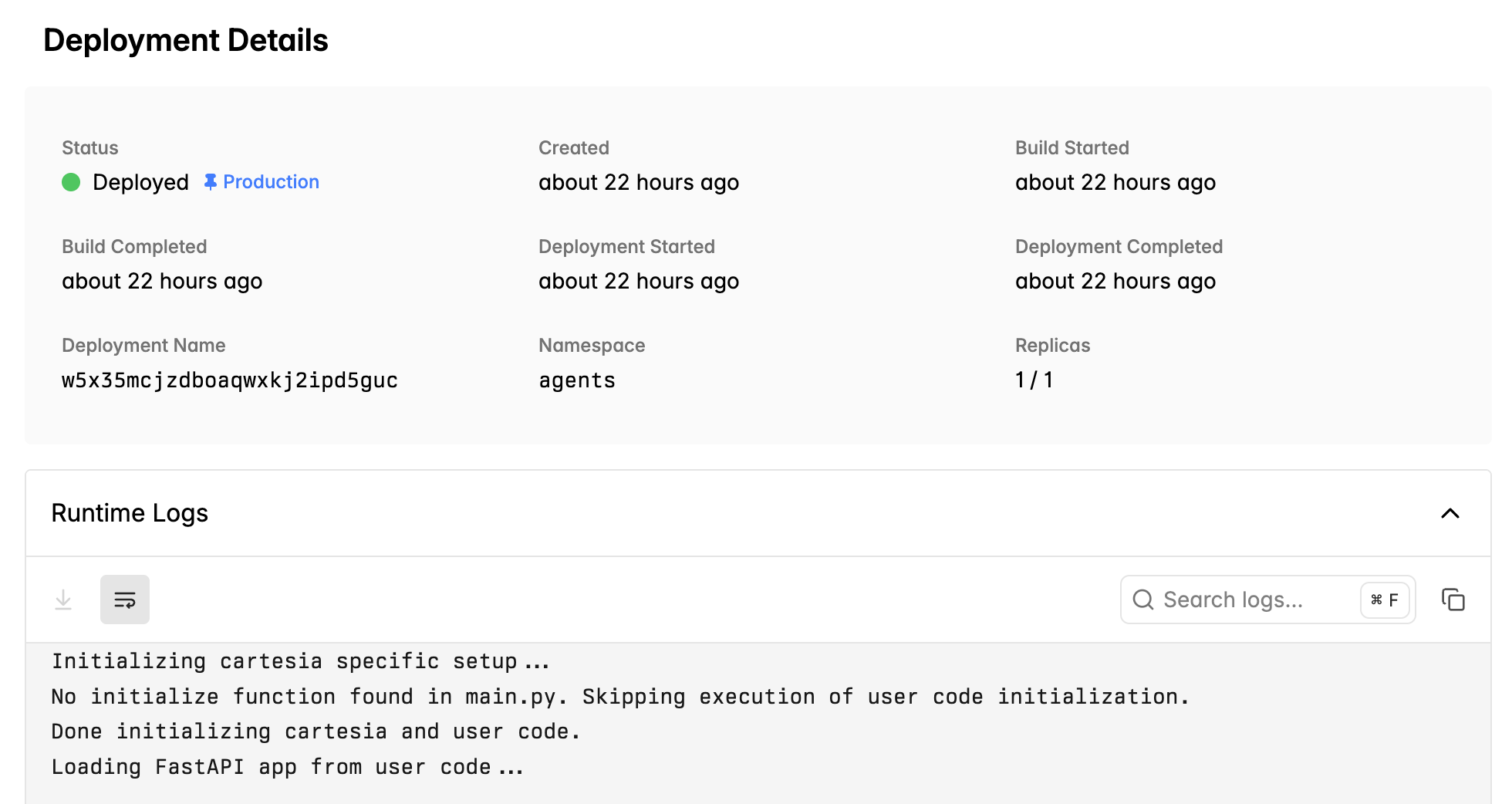
## Deployment
Each deployment generates a unique ID. View logs in the console.
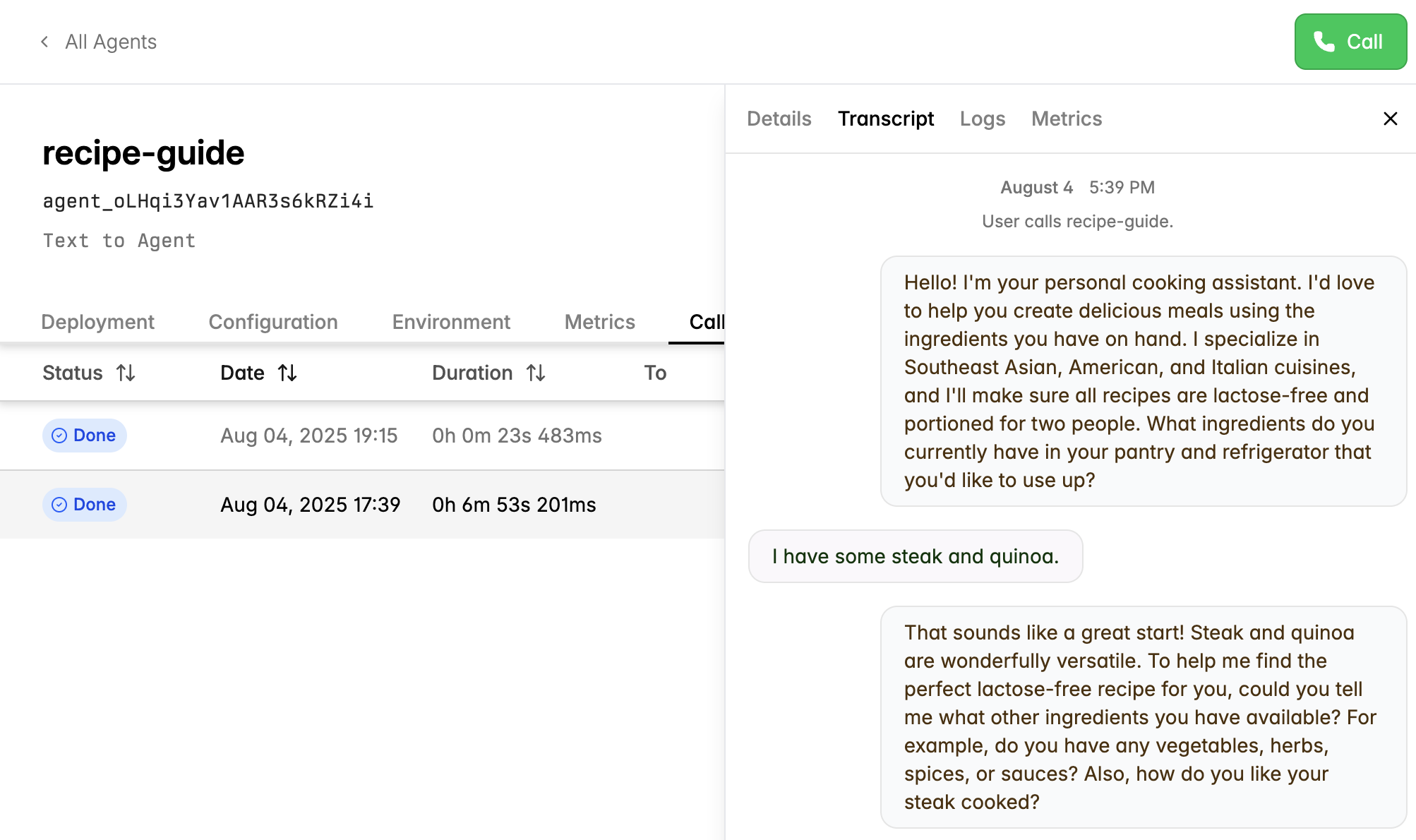
## Call Logs
You can click into a call and view any logging statements generated by your reasoning code.
## Transcripts
Each call has a transcript with independently separated transcribed audio and text to be generated. When you export these
transcripts with the API or CLI, these include more granular turn level timestamps.
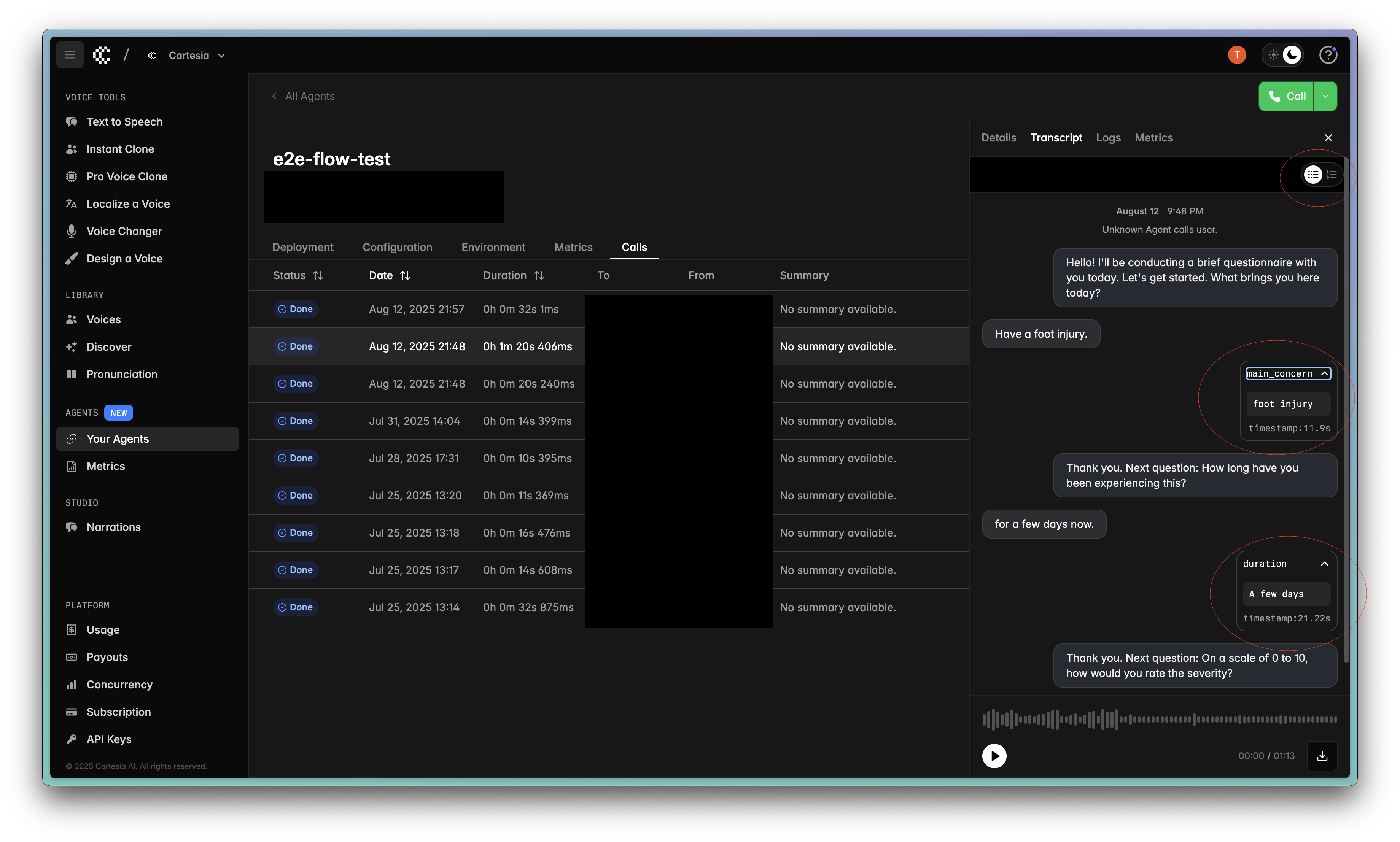
## Loggable Events
Record events without tying them to tool calls.
### SDK
In the SDK, yield `LogMessage` events from your agent or tools to record custom events:
```python theme={null}
from line.events import LogMessage
@loopback_tool
async def process_order(ctx, order_id: Annotated[str, "Order ID"]):
"""Process a customer order."""
result = await api.process_order(order_id)
# Log a custom event
yield LogMessage(
name="order_processed",
level="info",
message=f"Processed order {order_id}",
metadata={"status": result.status, "order_id": order_id}
)
return f"Order {order_id} processed: {result.status}"
```
Events are automatically sent to the platform when yielded.
### Websocket
If you're not using the SDK and instead just relying on the bare websocket, logging events will look like this:
```json theme={null}
{
"type": "log_event",
"event": "event_name",
"metadata": {
"key": "value"
}
}
```
### Playground
You can view these events in the Playground under the `Transcript` tab of the call.
## Loggable Metrics
Record metrics at any point in your workflow.
### SDK
In the context of the SDK, we can log a metric by broadcasting the `LogMetric` event.
Here's a snippet from the form filling template that exhibits this:
```python theme={null}
# Record the answer in form manager
success = self.form_manager.record_answer(answer)
if success:
# Log metric for the answered question
if current_question:
metric_name = current_question["id"]
yield LogMetric(name=metric_name, value=answer)
logger.info(f"📊 Logged metric: {metric_name}={answer}")
```
The user bridge is subscribed to the `LogMetric` event by default, and it will
log it over the websocket by default when it sees that `LogMetric` has been broadcast.
### Websocket
If you're not using the SDK and instead just relying on the bare websocket, logging metrics will look like this:
```json theme={null}
{
"type": "log_metric",
"name": "metric_name",
"value": "metric_value"
}
```
### Playground
You can view these events in the Playground under the `Transcript` tab of the call.
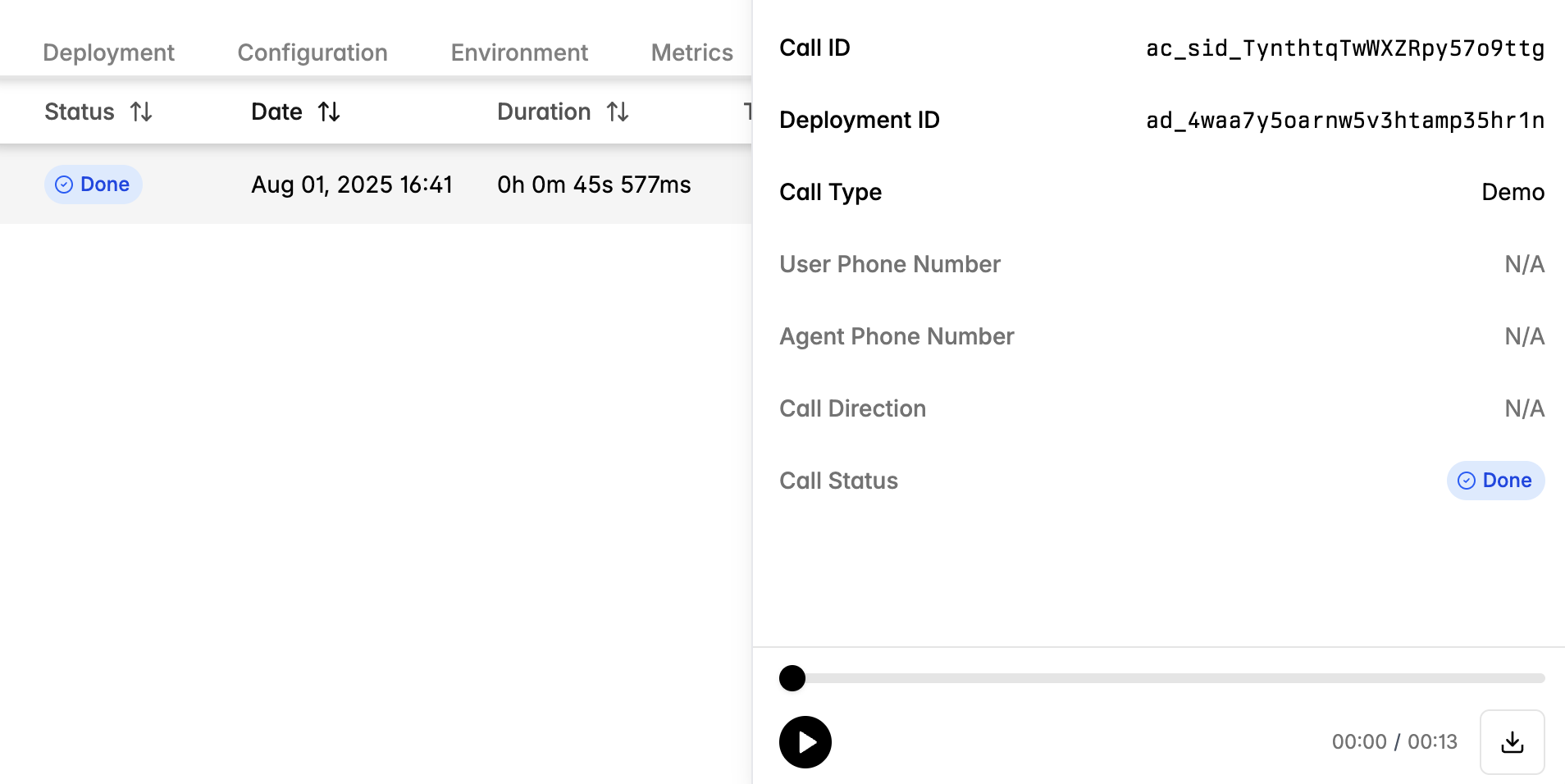
## Call Recordings
Call recordings can be downloaded from the playground.
## Webhooks
Cartesia sends webhook events to your **HTTPS** endpoint throughout the call lifecycle. Expose **`POST`** + **`application/json`** and verify the **`x-webhook-secret`** header matches your stored secret.
### Register a webhook
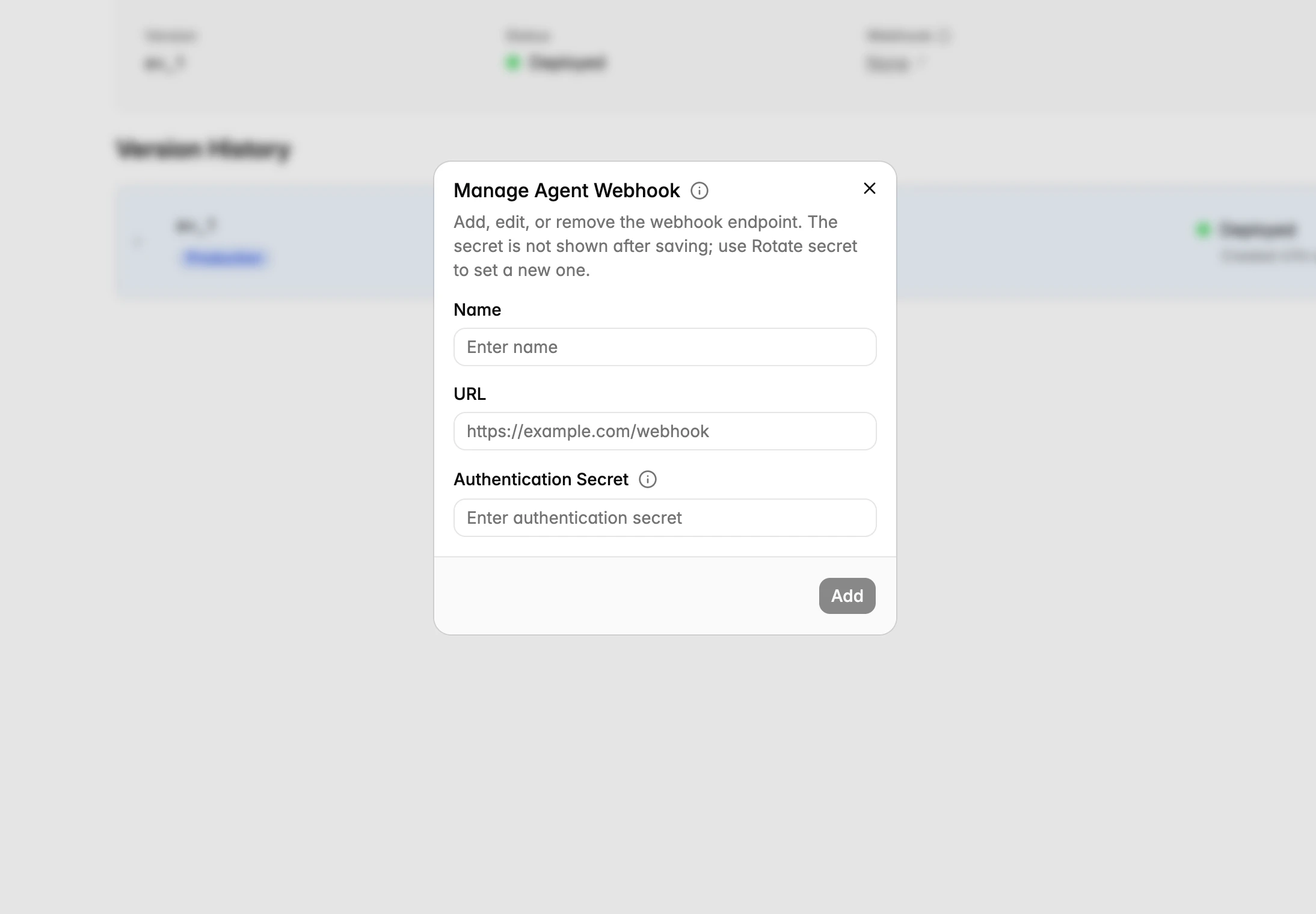
Use webhooks to receive call and turn events. Attaching a webhook (URL + secret) to an agent turns on delivery for that agent's calls, and one webhook can be attached to multiple agents.
Open your agent's **Webhook** settings and enter an `https` **URL** and a **secret** (Cartesia returns the string in the `x-webhook-secret` header on every delivery so you can verify the request).
Manage webhooks with a platform API key. The secret is always omitted from API responses.
```bash theme={null}
# Create a webhook (response includes its id and secret)
curl -X POST "https://api.cartesia.ai/agents/webhooks" \
-H "X-API-Key: your-api-key" \
-H "Cartesia-Version: 2026-03-01" \
-H "Content-Type: application/json" \
-d '{"url": "https://your-server.example/webhooks/cartesia", "secret": "YOUR_WEBHOOK_SECRET"}'
# Attach it to an agent (turns on delivery for that agent)
curl -X PATCH "https://api.cartesia.ai/agents/{agent_id}" \
-H "X-API-Key: your-api-key" \
-H "Cartesia-Version: 2026-03-01" \
-H "Content-Type: application/json" \
-d '{"webhook_id": "agent_webhook_..."}'
```
### Verify the webhook secret
```python theme={null}
if request.headers.get("x-webhook-secret") != os.environ["LINE_WEBHOOK_SECRET"]:
return jsonify({"error": "unauthorized"}), 401
```
```typescript theme={null}
if (req.headers["x-webhook-secret"] !== process.env.LINE_WEBHOOK_SECRET)
return res.status(401).json({ error: "unauthorized" });
```
### Event types
| Event | When | Typed field |
| -------------------- | ------------------------------ | ----------- |
| `call_started` | Call session begins | `call` |
| `call_completed` | Call ends normally | `call` |
| `call_failed` | Call ends with error | `call` |
| `call_turn` | Each conversational turn | `turn` |
| `post_call_analysis` | After async analysis completes | `analysis` |
### Envelope fields
Every webhook event includes these top-level fields:
| Field | Description |
| ------------ | ----------------------------- |
| `type` | Event type (see table above). |
| `call_id` | Call identifier. |
| `agent_id` | Agent that handled the call. |
| `webhook_id` | Webhook config id. |
| `timestamp` | RFC 3339 event time. |
### `call`
Present on `call_started`, `call_completed`, and `call_failed` events. Matches the [GET /agents/calls/\{call\_id}](/api-reference/agents/calls/get-call) response. Some events (e.g. `call_started`) may omit fields like `end_time` that do not yet have a valid value.
| Field | Description |
| ----------------------------------------- | ---------------------------------------------------------------------------------------------------------------------------------------------- |
| `id` | Call identifier. |
| `agent_id` / `agent_name` | Agent details. |
| `status` | `started`, `completed`, or `failed`. |
| `start_time` / `end_time` | RFC 3339 timestamps. |
| `end_reason` | Why the call ended (e.g. `client_hangup`, `agent_hangup`, `inactivity`). See [EndReason](/api-reference/agents/calls/get-call) for all values. |
| `transcript` | Array of turns (see `turn` below). |
| `telephony_params` | `from`, `to`, `direction`, `call_sid`, `connection_type`. |
| `telephony_account_type` | `cartesia`, `twilio`, or `sip_trunk`. |
| `deployment_id` / `deployment_version_id` | Deployment that served the call (when applicable). |
| `deployment_region` | `US`, `EU`, or `APAC`. |
| `error_message` | Error detail (failed calls only). |
| `metadata` | User-supplied metadata passed at call start. |
| `summary` | Call summary (if available at event time). |
### `turn`
Present on `call_turn` events. One turn per agent or user utterance.
| Field | Description |
| ----------------------------------- | --------------------------------------------------------------- |
| `role` | `assistant` or `user`. |
| `text` | Turn text. |
| `start_timestamp` / `end_timestamp` | Seconds from call start. |
| `stt_ttfb` | User speech-to-text time-to-first-byte (seconds), when present. |
| `tts_ttfb` | Agent TTS time-to-first-byte (seconds), when present. |
| `tool_calls` | Tool calls made during this turn, when present. |
### `analysis`
Present on `post_call_analysis` events. Sent after async analysis completes (currently summary generation; evaluations and metrics will be added here in the future).
| Field | Description |
| --------- | -------------------------- |
| `summary` | 1-2 sentence call summary. |
### Example: `call_completed`
```json theme={null}
{
"type": "call_completed",
"call_id": "ac_sid_gqkgRWUz2u64qFUjA1mZyr",
"agent_id": "agent_rwh4HGMgyhK7rM5ucVqbiC",
"webhook_id": "agent_webhook_P3MgdLf1cpaucZJ7xWehCC",
"end_reason": "client_hangup",
"timestamp": "2026-04-16T01:08:50.061907836Z",
"call": {
"id": "ac_sid_gqkgRWUz2u64qFUjA1mZyr",
"agent_id": "agent_rwh4HGMgyhK7rM5ucVqbiC",
"agent_name": "My Agent",
"status": "completed",
"start_time": "2026-04-16T01:08:37.413659Z",
"end_time": "2026-04-16T01:08:50.036327Z",
"end_reason": "client_hangup",
"telephony_params": {
"from": "websocket",
"to": "agent_rwh4HGMgyhK7rM5ucVqbiC",
"connection_type": "websocket"
},
"transcript": [
{
"role": "assistant",
"text": "Hi there! How can I help you today?",
"start_timestamp": 0.41,
"end_timestamp": 3.2,
"tts_ttfb": 0.065
},
{
"role": "user",
"text": "I want to schedule an appointment.",
"start_timestamp": 3.5,
"end_timestamp": 5.8
}
]
}
}
```
### Example: `post_call_analysis`
```json theme={null}
{
"type": "post_call_analysis",
"call_id": "ac_sid_gqkgRWUz2u64qFUjA1mZyr",
"agent_id": "agent_rwh4HGMgyhK7rM5ucVqbiC",
"webhook_id": "agent_webhook_P3MgdLf1cpaucZJ7xWehCC",
"timestamp": "2026-04-16T01:08:50.955058787Z",
"analysis": {
"summary": "The caller requested to schedule an appointment. The agent confirmed availability and booked a slot."
}
}
```
### Test your endpoint
```bash theme={null}
curl -sS -X POST "https://your-server.example/webhooks/cartesia" \
-H "Content-Type: application/json" \
-H "x-webhook-secret: YOUR_WEBHOOK_SECRET" \
-d '{
"type": "call_completed",
"call_id": "ac_test_123",
"agent_id": "agent_demo",
"webhook_id": "agent_webhook_test",
"timestamp": "2026-01-01T00:00:00.000000000Z",
"call": {
"id": "ac_test_123",
"agent_id": "agent_demo",
"agent_name": "Test Agent",
"status": "completed",
"end_reason": "client_hangup",
"transcript": []
}
}'
```
For backwards compatibility:
* `call_completed` and `call_failed` events also include a top-level `body` (transcript array) and a top-level `end_reason`. Use `call.transcript` and `call.end_reason` instead.
* `call_turn` events also include a top-level `body` containing the raw turn payload. Use `turn` instead.
These deprecated fields will be removed in a future release.
 ## Call Logs
You can click into a call and view any logging statements generated by your reasoning code.
## Transcripts
Each call has a transcript with independently separated transcribed audio and text to be generated. When you export these
transcripts with the API or CLI, these include more granular turn level timestamps.
## Call Logs
You can click into a call and view any logging statements generated by your reasoning code.
## Transcripts
Each call has a transcript with independently separated transcribed audio and text to be generated. When you export these
transcripts with the API or CLI, these include more granular turn level timestamps.
 ## Loggable Events
Record events without tying them to tool calls.
### SDK
In the SDK, yield `LogMessage` events from your agent or tools to record custom events:
```python theme={null}
from line.events import LogMessage
@loopback_tool
async def process_order(ctx, order_id: Annotated[str, "Order ID"]):
"""Process a customer order."""
result = await api.process_order(order_id)
# Log a custom event
yield LogMessage(
name="order_processed",
level="info",
message=f"Processed order {order_id}",
metadata={"status": result.status, "order_id": order_id}
)
return f"Order {order_id} processed: {result.status}"
```
Events are automatically sent to the platform when yielded.
### Websocket
If you're not using the SDK and instead just relying on the bare websocket, logging events will look like this:
```json theme={null}
{
"type": "log_event",
"event": "event_name",
"metadata": {
"key": "value"
}
}
```
### Playground
You can view these events in the Playground under the `Transcript` tab of the call.
## Loggable Metrics
Record metrics at any point in your workflow.
### SDK
In the context of the SDK, we can log a metric by broadcasting the `LogMetric` event.
Here's a snippet from the form filling template that exhibits this:
```python theme={null}
# Record the answer in form manager
success = self.form_manager.record_answer(answer)
if success:
# Log metric for the answered question
if current_question:
metric_name = current_question["id"]
yield LogMetric(name=metric_name, value=answer)
logger.info(f"📊 Logged metric: {metric_name}={answer}")
```
The user bridge is subscribed to the `LogMetric` event by default, and it will
log it over the websocket by default when it sees that `LogMetric` has been broadcast.
### Websocket
If you're not using the SDK and instead just relying on the bare websocket, logging metrics will look like this:
```json theme={null}
{
"type": "log_metric",
"name": "metric_name",
"value": "metric_value"
}
```
### Playground
You can view these events in the Playground under the `Transcript` tab of the call.
## Loggable Events
Record events without tying them to tool calls.
### SDK
In the SDK, yield `LogMessage` events from your agent or tools to record custom events:
```python theme={null}
from line.events import LogMessage
@loopback_tool
async def process_order(ctx, order_id: Annotated[str, "Order ID"]):
"""Process a customer order."""
result = await api.process_order(order_id)
# Log a custom event
yield LogMessage(
name="order_processed",
level="info",
message=f"Processed order {order_id}",
metadata={"status": result.status, "order_id": order_id}
)
return f"Order {order_id} processed: {result.status}"
```
Events are automatically sent to the platform when yielded.
### Websocket
If you're not using the SDK and instead just relying on the bare websocket, logging events will look like this:
```json theme={null}
{
"type": "log_event",
"event": "event_name",
"metadata": {
"key": "value"
}
}
```
### Playground
You can view these events in the Playground under the `Transcript` tab of the call.
## Loggable Metrics
Record metrics at any point in your workflow.
### SDK
In the context of the SDK, we can log a metric by broadcasting the `LogMetric` event.
Here's a snippet from the form filling template that exhibits this:
```python theme={null}
# Record the answer in form manager
success = self.form_manager.record_answer(answer)
if success:
# Log metric for the answered question
if current_question:
metric_name = current_question["id"]
yield LogMetric(name=metric_name, value=answer)
logger.info(f"📊 Logged metric: {metric_name}={answer}")
```
The user bridge is subscribed to the `LogMetric` event by default, and it will
log it over the websocket by default when it sees that `LogMetric` has been broadcast.
### Websocket
If you're not using the SDK and instead just relying on the bare websocket, logging metrics will look like this:
```json theme={null}
{
"type": "log_metric",
"name": "metric_name",
"value": "metric_value"
}
```
### Playground
You can view these events in the Playground under the `Transcript` tab of the call.
 ## Call Recordings
Call recordings can be downloaded from the playground.
## Call Recordings
Call recordings can be downloaded from the playground.
 ## Webhooks
Cartesia sends webhook events to your **HTTPS** endpoint throughout the call lifecycle. Expose **`POST`** + **`application/json`** and verify the **`x-webhook-secret`** header matches your stored secret.
## Webhooks
Cartesia sends webhook events to your **HTTPS** endpoint throughout the call lifecycle. Expose **`POST`** + **`application/json`** and verify the **`x-webhook-secret`** header matches your stored secret.
 ### Register a webhook
Use webhooks to receive call and turn events. Attaching a webhook (URL + secret) to an agent turns on delivery for that agent's calls, and one webhook can be attached to multiple agents.
### Register a webhook
Use webhooks to receive call and turn events. Attaching a webhook (URL + secret) to an agent turns on delivery for that agent's calls, and one webhook can be attached to multiple agents.