> ## Documentation Index
> Fetch the complete documentation index at: https://docs.cartesia.ai/llms.txt
> Use this file to discover all available pages before exploring further.
# TrueFoundry + Cartesia
> Route Cartesia TTS and STT through TrueFoundry's AI Gateway
Last verified: 2026-06-10
## Overview
[**TrueFoundry AI Gateway**](https://www.truefoundry.com/ai-gateway) is the proxy layer that sits between your applications and the LLM providers and MCP Servers. It provides a unified OpenAI-compatible API to route requests across 1000+ LLMs while handling observability, governance, and access control at the gateway level.
**Cartesia** is available as a first-party provider in TrueFoundry's AI Gateway for [**TTS and STT**](https://www.truefoundry.com/docs/ai-gateway/cartesia). Register Cartesia models in the gateway, then call them with the Cartesia Python SDK and your TrueFoundry API key.
## Prerequisites
* Sign up for a [TrueFoundry account](https://www.truefoundry.com)
* Get a TrueFoundry API key (`TFY_API_KEY`) from [making requests via the gateway](https://www.truefoundry.com/docs/ai-gateway/making-llm-requests-via-gateway)
* Get a Cartesia API key from [Cartesia keys](https://play.cartesia.ai/keys)
* Python 3.10+
Follow these steps to connect Cartesia in AI Gateway:
In the TrueFoundry dashboard, go to **AI Gateway** → **Models** and select **Cartesia**. See [TrueFoundry Cartesia setup](https://www.truefoundry.com/docs/ai-gateway/cartesia) for the full navigation path.
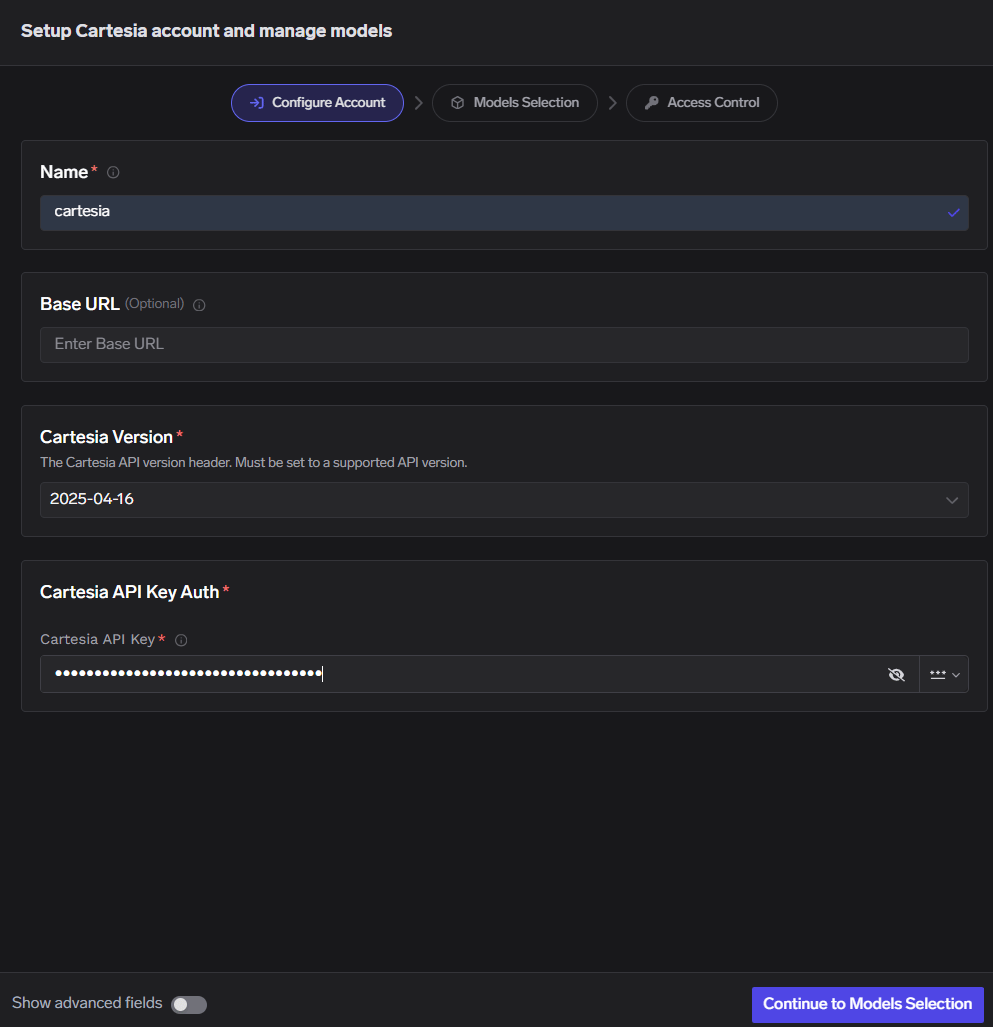
Click **Add Cartesia Account**. Enter a unique account name and your Cartesia **API Key**. Optionally add collaborators so other users or teams can use this account — see [gateway access control](https://www.truefoundry.com/docs/ai-gateway/gateway-access-control).
 Click **+ Add Model** and set **Display name**, **Model ID**, and **Model type**.
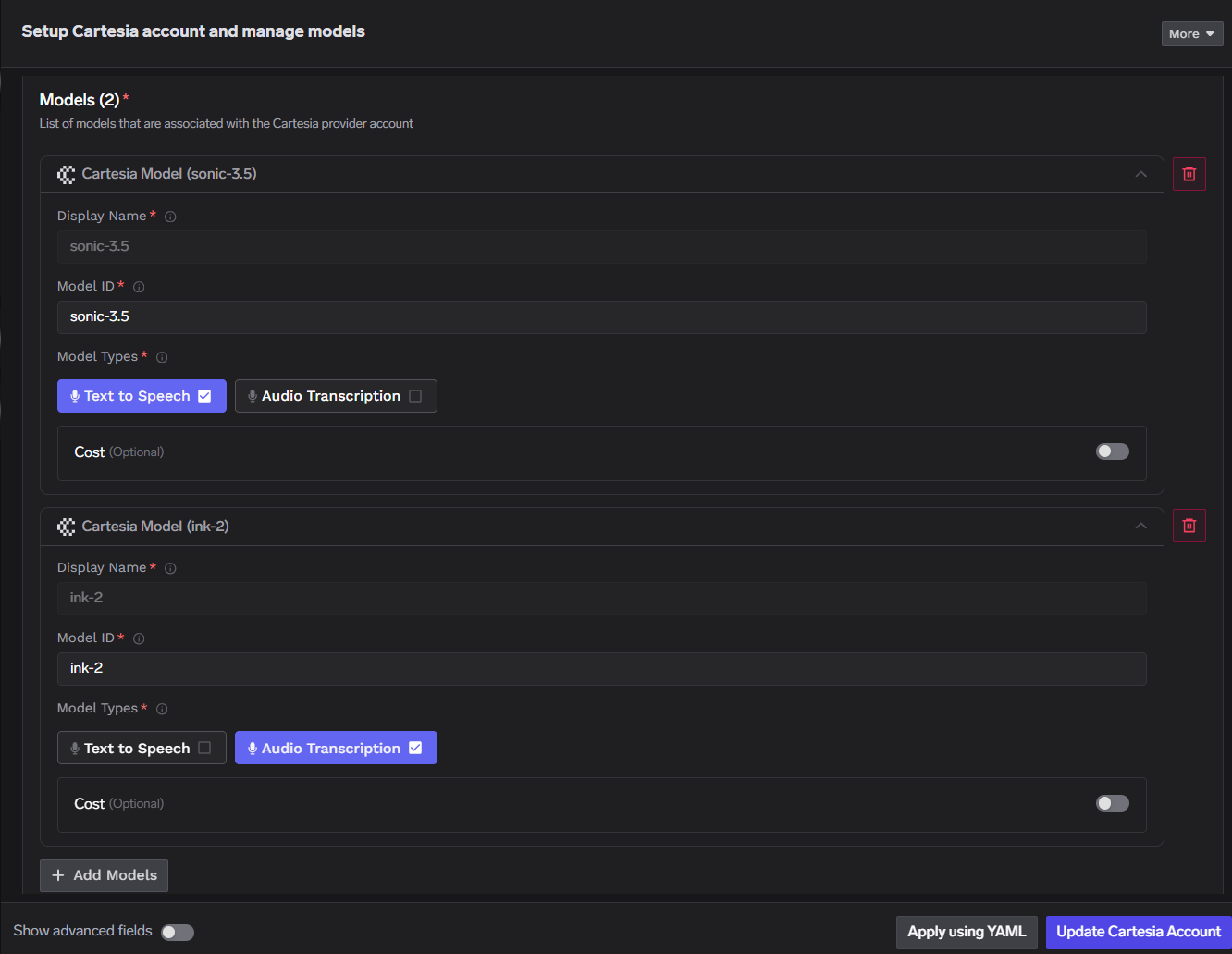 For Cartesia, **Model ID** and **Display name** must be identical.
## Installation
```bash theme={null}
pip install cartesia httpx
```
## Quick start
### TTS
Point `AsyncCartesia` at your gateway TTS route. Replace `GATEWAY_BASE_URL`, `cartesiaProviderAccountName`, `TFY_API_KEY`, and `model_id` with values from your TrueFoundry workspace.
```python theme={null}
import asyncio
import httpx
from cartesia import AsyncCartesia
TFY_API_KEY = "your-tfy-api-key"
BASE_URL = "{GATEWAY_BASE_URL}/tts/{cartesiaProviderAccountName}"
OUTPUT_FILE = "/path/to/output.wav"
client = AsyncCartesia(
api_key="dummy", # gateway auth uses x-tfy-api-key, not Cartesia api_key
base_url=BASE_URL,
http_client=httpx.AsyncClient(
headers={"x-tfy-api-key": TFY_API_KEY},
),
)
async def main():
response = await client.tts.generate(
model_id="sonic-3.5", # must match a model ID registered in AI Gateway
transcript="Welcome to Cartesia Sonic!",
voice={"mode": "id", "id": "a0e99841-438c-4a64-b679-ae501e7d6091"},
language="en",
output_format={
"container": "wav",
"sample_rate": 44100,
"encoding": "pcm_s16le",
},
)
with open(OUTPUT_FILE, "wb") as f:
f.write(await response.read())
print(OUTPUT_FILE)
asyncio.run(main())
```
| Parameter | Type | Description |
| ----------------------------- | -------- | ------------------------------------------------------------------------------- |
| `GATEWAY_BASE_URL` | `string` | Gateway base URL from TrueFoundry (no trailing slash) |
| `cartesiaProviderAccountName` | `string` | Cartesia provider account name under **AI Gateway** → **Models** → **Cartesia** |
| `TFY_API_KEY` | `string` | TrueFoundry API key sent as the `x-tfy-api-key` header |
| `model_id` | `string` | Cartesia model ID; must match **Model ID** and **Display name** in the gateway |
### STT
Register an STT model type in the gateway, then point `AsyncCartesia` at your gateway STT route. Replace `GATEWAY_BASE_URL`, `cartesiaProviderAccountName`, `TFY_API_KEY`, and `model` with values from your TrueFoundry workspace.
```python theme={null}
import asyncio
import httpx
from cartesia import AsyncCartesia
TFY_API_KEY = "your-tfy-api-key"
BASE_URL = "{GATEWAY_BASE_URL}/stt/{cartesiaProviderAccountName}"
AUDIO_FILE = "/path/to/audio.wav"
client = AsyncCartesia(
api_key="dummy", # gateway auth uses x-tfy-api-key, not Cartesia api_key
base_url=BASE_URL,
http_client=httpx.AsyncClient(
headers={"x-tfy-api-key": TFY_API_KEY},
),
)
async def main():
with open(AUDIO_FILE, "rb") as f:
response = await client.stt.transcribe(
file=f,
model="ink-2", # must match a model ID registered in AI Gateway
language="en",
)
print(response.text)
asyncio.run(main())
```
| Parameter | Type | Description |
| ----------------------------- | -------- | ---------------------------------------------------------------------------------- |
| `GATEWAY_BASE_URL` | `string` | Gateway base URL from TrueFoundry (no trailing slash) |
| `cartesiaProviderAccountName` | `string` | Cartesia provider account name under **AI Gateway** → **Models** → **Cartesia** |
| `TFY_API_KEY` | `string` | TrueFoundry API key sent as the `x-tfy-api-key` header |
| `model` | `string` | Cartesia STT model ID; must match **Model ID** and **Display name** in the gateway |
| `AUDIO_FILE` | `string` | Path to a local audio file (WAV, MP3, and other common formats) |
After models are registered, open any Cartesia model in the TrueFoundry dashboard and use **Code Snippet** or **Try in Playground** to test TTS and STT requests before wiring them into your app.
Dashboard walkthrough, model configuration, and inference examples.
Share Cartesia provider accounts with collaborators and teams.
## Resources
* [Making requests via the gateway](https://www.truefoundry.com/docs/ai-gateway/making-llm-requests-via-gateway)
* [Cartesia TTS API reference](/api-reference/tts/tts)
* [Cartesia STT API reference](/api-reference/stt/transcribe)
For Cartesia, **Model ID** and **Display name** must be identical.
## Installation
```bash theme={null}
pip install cartesia httpx
```
## Quick start
### TTS
Point `AsyncCartesia` at your gateway TTS route. Replace `GATEWAY_BASE_URL`, `cartesiaProviderAccountName`, `TFY_API_KEY`, and `model_id` with values from your TrueFoundry workspace.
```python theme={null}
import asyncio
import httpx
from cartesia import AsyncCartesia
TFY_API_KEY = "your-tfy-api-key"
BASE_URL = "{GATEWAY_BASE_URL}/tts/{cartesiaProviderAccountName}"
OUTPUT_FILE = "/path/to/output.wav"
client = AsyncCartesia(
api_key="dummy", # gateway auth uses x-tfy-api-key, not Cartesia api_key
base_url=BASE_URL,
http_client=httpx.AsyncClient(
headers={"x-tfy-api-key": TFY_API_KEY},
),
)
async def main():
response = await client.tts.generate(
model_id="sonic-3.5", # must match a model ID registered in AI Gateway
transcript="Welcome to Cartesia Sonic!",
voice={"mode": "id", "id": "a0e99841-438c-4a64-b679-ae501e7d6091"},
language="en",
output_format={
"container": "wav",
"sample_rate": 44100,
"encoding": "pcm_s16le",
},
)
with open(OUTPUT_FILE, "wb") as f:
f.write(await response.read())
print(OUTPUT_FILE)
asyncio.run(main())
```
| Parameter | Type | Description |
| ----------------------------- | -------- | ------------------------------------------------------------------------------- |
| `GATEWAY_BASE_URL` | `string` | Gateway base URL from TrueFoundry (no trailing slash) |
| `cartesiaProviderAccountName` | `string` | Cartesia provider account name under **AI Gateway** → **Models** → **Cartesia** |
| `TFY_API_KEY` | `string` | TrueFoundry API key sent as the `x-tfy-api-key` header |
| `model_id` | `string` | Cartesia model ID; must match **Model ID** and **Display name** in the gateway |
### STT
Register an STT model type in the gateway, then point `AsyncCartesia` at your gateway STT route. Replace `GATEWAY_BASE_URL`, `cartesiaProviderAccountName`, `TFY_API_KEY`, and `model` with values from your TrueFoundry workspace.
```python theme={null}
import asyncio
import httpx
from cartesia import AsyncCartesia
TFY_API_KEY = "your-tfy-api-key"
BASE_URL = "{GATEWAY_BASE_URL}/stt/{cartesiaProviderAccountName}"
AUDIO_FILE = "/path/to/audio.wav"
client = AsyncCartesia(
api_key="dummy", # gateway auth uses x-tfy-api-key, not Cartesia api_key
base_url=BASE_URL,
http_client=httpx.AsyncClient(
headers={"x-tfy-api-key": TFY_API_KEY},
),
)
async def main():
with open(AUDIO_FILE, "rb") as f:
response = await client.stt.transcribe(
file=f,
model="ink-2", # must match a model ID registered in AI Gateway
language="en",
)
print(response.text)
asyncio.run(main())
```
| Parameter | Type | Description |
| ----------------------------- | -------- | ---------------------------------------------------------------------------------- |
| `GATEWAY_BASE_URL` | `string` | Gateway base URL from TrueFoundry (no trailing slash) |
| `cartesiaProviderAccountName` | `string` | Cartesia provider account name under **AI Gateway** → **Models** → **Cartesia** |
| `TFY_API_KEY` | `string` | TrueFoundry API key sent as the `x-tfy-api-key` header |
| `model` | `string` | Cartesia STT model ID; must match **Model ID** and **Display name** in the gateway |
| `AUDIO_FILE` | `string` | Path to a local audio file (WAV, MP3, and other common formats) |
After models are registered, open any Cartesia model in the TrueFoundry dashboard and use **Code Snippet** or **Try in Playground** to test TTS and STT requests before wiring them into your app.
Dashboard walkthrough, model configuration, and inference examples.
Share Cartesia provider accounts with collaborators and teams.
## Resources
* [Making requests via the gateway](https://www.truefoundry.com/docs/ai-gateway/making-llm-requests-via-gateway)
* [Cartesia TTS API reference](/api-reference/tts/tts)
* [Cartesia STT API reference](/api-reference/stt/transcribe)