> ## Documentation Index
> Fetch the complete documentation index at: https://docs.cartesia.ai/llms.txt
> Use this file to discover all available pages before exploring further.
# システムツール
> 通話とテレフォニー向けの組み込みアクションを設定します。
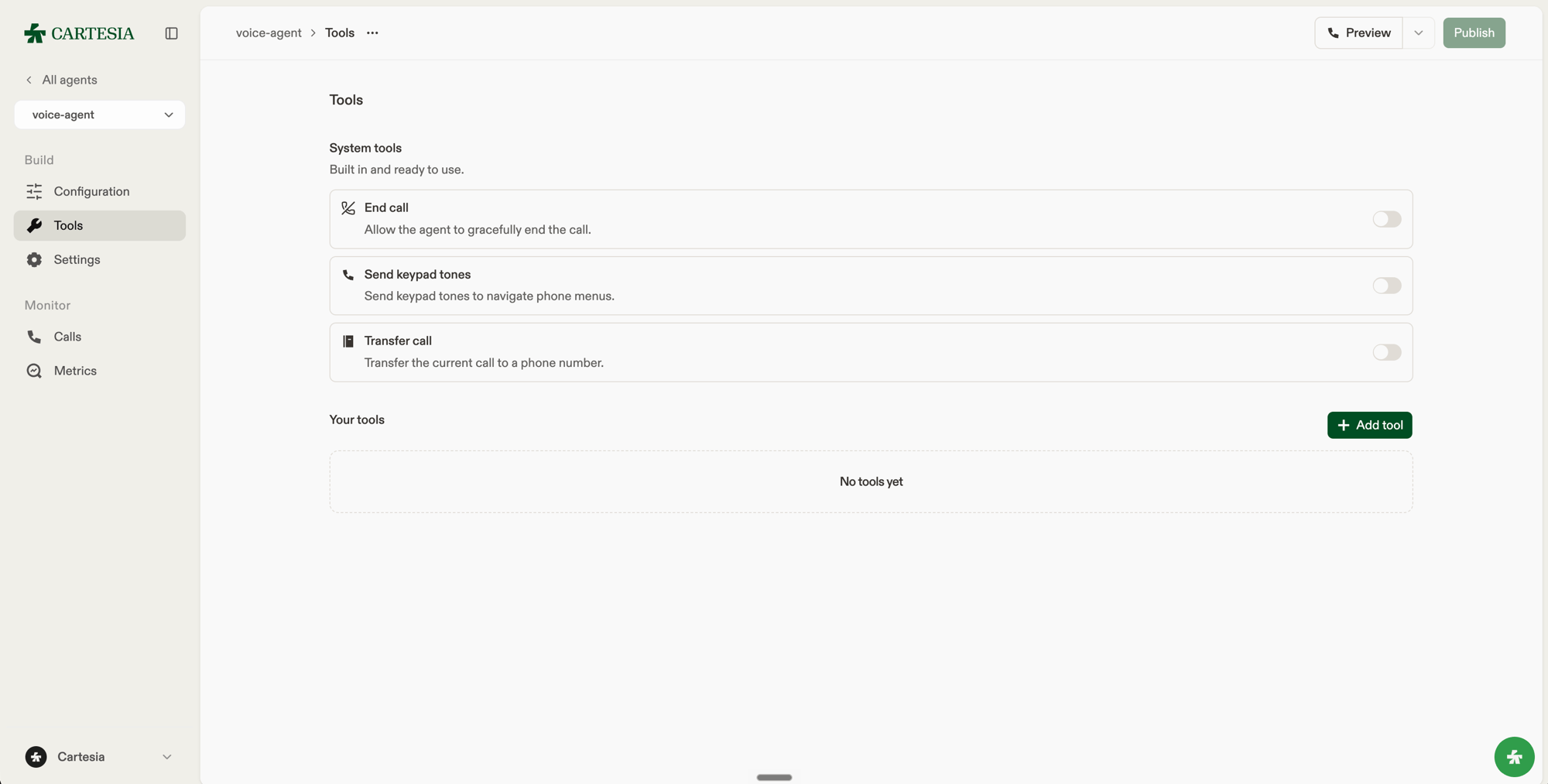
システムツールは Cartesia が提供・実行します。どれを有効にするかを選び、エージェント上で設定します。`config.system_tools` は現在、`end_call`、`send_dtmf`、`transfer_to_number` の 3 つのツールをサポートしています。
 ```json theme={null}
{
"config": {
"system_tools": {
"end_call": {
"description": "End the call after the caller explicitly says goodbye.",
"pre_tool_speech": "force"
},
"send_dtmf": null,
"transfer_to_number": {
"description": null,
"pre_tool_speech": "auto",
"transfers": [
{
"destination": {
"type": "phone",
"phone_number": "+14155550100"
},
"condition": "The caller asks to speak with billing."
}
]
}
}
}
}
```
エージェントのレスポンスには 3 つのシステムツールすべてが含まれ、無効なツールは `null` になります。`PATCH` リクエストの `config.system_tools` では:
* ツールを省略すると、現在の設定が変更されません。
* `null` を送信すると、ツールが無効になります。
* 設定オブジェクトを送信すると、ツールの設定を有効化または更新できます。
`end_call` と `send_dtmf` では、`{}` を送るとツールがデフォルト設定で有効になります。現在の設定を変更せずに残すという意味にはなりません。ツールの説明は当社のシステムに最適化されたデフォルトのままにすることを一般的に推奨しますが、より細かく制御したい場合は、`description` を設定して、モデルがどのように・いつツールを呼び出すべきかを指示できます。たとえば、通話を終了する前に明示的な別れのあいさつを必須にしたり、留守番電話につながったときにエージェントが電話を切らないようにしたりできます。`null` に設定すると、組み込みの説明が使用されます。
`pre_tool_speech` は、行動する前にエージェントが話すかどうかを制御します。`auto` はエージェントに任せ、`force` は先に話すよう求めます。
## End call
会話が完了したとき、または発信者が電話を切るよう求めたときに、エージェントが通話を終了できるようにします。
## Send DTMF
電話メニューの操作中に、エージェントが `12#` のような 1 つ以上のキーパッドトーンを送信できるようにします。サポートされるトーンは `0` から `9`、`*`、`#` です。
## Transfer to number
電話を設定済みの宛先に転送します。各宛先には、`+14155550123` のような E.164 形式の電話番号、`sip:user@host` のような SIP URI、または `{{transfer_number}}` のような[動的変数](/ja-jp/agents/dynamic-variables)を指定します。モデルがいつその宛先を使うべきかを示す条件を追加します。
宛先は、エージェント ID を使って [Update agent](/ja-jp/api-reference/agents/update) で設定します:
```json PATCH /v1/agents/{agent_id} theme={null}
{
"config": {
"system_tools": {
"transfer_to_number": {
"transfers": [
{
"destination": { "type": "phone", "phone_number": "+14155550100" },
"condition": "The caller has a billing or payment question."
},
{
"destination": { "type": "sip_uri", "sip_uri": "sip:user@host" },
"condition": "The caller reports a technical problem with their device."
},
{
"destination": { "type": "phone", "phone_number": "{{transfer_number}}" },
"condition": "The caller asks for a person and no other destination applies."
}
]
}
}
}
}
```
`transfer_number` のような動的変数は、アウトバウンド通話リクエストまたは Webhook の代入(assignment)で供給します。電話の宛先として使用する変数には、転送の実行時に有効な E.164 番号が含まれている必要があります。条件とツールの説明も動的変数をサポートします。
プレイグラウンドでは、**Tools** を開いて **Transfer call** を有効にし、各ルールの **Destination** で **Phone number**、**SIP URI**、または **Dynamic variable** を選択します。
`type` を `"sip_uri"` に設定し、`sip:user@host` または `sips:user@host` の形式で `sip_uri` を指定します。スキームは小文字にし、user と host の両方を含めてください。
`sip_uri` には、`{{sip_uri}}` のような単一の動的変数を指定することもできます。この場合、転送の実行時に変数の値が完全な SIP URI になっている必要があります。`sip:{{user}}@host` のように URI の内部で変数を使うことはサポートされていません。プレイグラウンドでは、ルールの **Destination** で **Dynamic variable** を選択し、**Destination type** を **SIP URI** に設定します。
転送には、Twilio または SIP トランク経由の電話通話が必要です。SIP URI の宛先には [SIP トランキング](/ja-jp/line/integrations/telephony/sip-trunking#transfer-calls)が必要です。
プレイグラウンドおよび v1 WebSocket の通話では、ツールは通話を転送する代わりにエラーを返します。
This documentation is built and hosted on [Mintlify](https://mintlify.com), a developer documentation platform.
```json theme={null}
{
"config": {
"system_tools": {
"end_call": {
"description": "End the call after the caller explicitly says goodbye.",
"pre_tool_speech": "force"
},
"send_dtmf": null,
"transfer_to_number": {
"description": null,
"pre_tool_speech": "auto",
"transfers": [
{
"destination": {
"type": "phone",
"phone_number": "+14155550100"
},
"condition": "The caller asks to speak with billing."
}
]
}
}
}
}
```
エージェントのレスポンスには 3 つのシステムツールすべてが含まれ、無効なツールは `null` になります。`PATCH` リクエストの `config.system_tools` では:
* ツールを省略すると、現在の設定が変更されません。
* `null` を送信すると、ツールが無効になります。
* 設定オブジェクトを送信すると、ツールの設定を有効化または更新できます。
`end_call` と `send_dtmf` では、`{}` を送るとツールがデフォルト設定で有効になります。現在の設定を変更せずに残すという意味にはなりません。ツールの説明は当社のシステムに最適化されたデフォルトのままにすることを一般的に推奨しますが、より細かく制御したい場合は、`description` を設定して、モデルがどのように・いつツールを呼び出すべきかを指示できます。たとえば、通話を終了する前に明示的な別れのあいさつを必須にしたり、留守番電話につながったときにエージェントが電話を切らないようにしたりできます。`null` に設定すると、組み込みの説明が使用されます。
`pre_tool_speech` は、行動する前にエージェントが話すかどうかを制御します。`auto` はエージェントに任せ、`force` は先に話すよう求めます。
## End call
会話が完了したとき、または発信者が電話を切るよう求めたときに、エージェントが通話を終了できるようにします。
## Send DTMF
電話メニューの操作中に、エージェントが `12#` のような 1 つ以上のキーパッドトーンを送信できるようにします。サポートされるトーンは `0` から `9`、`*`、`#` です。
## Transfer to number
電話を設定済みの宛先に転送します。各宛先には、`+14155550123` のような E.164 形式の電話番号、`sip:user@host` のような SIP URI、または `{{transfer_number}}` のような[動的変数](/ja-jp/agents/dynamic-variables)を指定します。モデルがいつその宛先を使うべきかを示す条件を追加します。
宛先は、エージェント ID を使って [Update agent](/ja-jp/api-reference/agents/update) で設定します:
```json PATCH /v1/agents/{agent_id} theme={null}
{
"config": {
"system_tools": {
"transfer_to_number": {
"transfers": [
{
"destination": { "type": "phone", "phone_number": "+14155550100" },
"condition": "The caller has a billing or payment question."
},
{
"destination": { "type": "sip_uri", "sip_uri": "sip:user@host" },
"condition": "The caller reports a technical problem with their device."
},
{
"destination": { "type": "phone", "phone_number": "{{transfer_number}}" },
"condition": "The caller asks for a person and no other destination applies."
}
]
}
}
}
}
```
`transfer_number` のような動的変数は、アウトバウンド通話リクエストまたは Webhook の代入(assignment)で供給します。電話の宛先として使用する変数には、転送の実行時に有効な E.164 番号が含まれている必要があります。条件とツールの説明も動的変数をサポートします。
プレイグラウンドでは、**Tools** を開いて **Transfer call** を有効にし、各ルールの **Destination** で **Phone number**、**SIP URI**、または **Dynamic variable** を選択します。
`type` を `"sip_uri"` に設定し、`sip:user@host` または `sips:user@host` の形式で `sip_uri` を指定します。スキームは小文字にし、user と host の両方を含めてください。
`sip_uri` には、`{{sip_uri}}` のような単一の動的変数を指定することもできます。この場合、転送の実行時に変数の値が完全な SIP URI になっている必要があります。`sip:{{user}}@host` のように URI の内部で変数を使うことはサポートされていません。プレイグラウンドでは、ルールの **Destination** で **Dynamic variable** を選択し、**Destination type** を **SIP URI** に設定します。
転送には、Twilio または SIP トランク経由の電話通話が必要です。SIP URI の宛先には [SIP トランキング](/ja-jp/line/integrations/telephony/sip-trunking#transfer-calls)が必要です。
プレイグラウンドおよび v1 WebSocket の通話では、ツールは通話を転送する代わりにエラーを返します。
This documentation is built and hosted on [Mintlify](https://mintlify.com), a developer documentation platform.