> ## Documentation Index
> Fetch the complete documentation index at: https://docs.cartesia.ai/llms.txt
> Use this file to discover all available pages before exploring further.
# Stream Inputs using Continuations
> Learn how to stream input text to Sonic TTS
export const AudioPlayer = ({src}) => {
const [hasError, setHasError] = useState(false);
const [isLoading, setIsLoading] = useState(true);
useEffect(() => {
setIsLoading(true);
setHasError(false);
}, [src]);
const handleCanPlay = () => {
setIsLoading(false);
setHasError(false);
};
const handleError = () => {
setIsLoading(false);
setHasError(true);
};
const audioClasses = ["w-full", "rounded-full", isLoading || hasError ? "opacity-50" : "opacity-100", hasError ? "pointer-events-none" : "", "transition-opacity"].join(" ");
return
{isLoading && !hasError &&
Loading audio...
}
;
};
In many real-time use cases, you don't have input text available upfront—like when you're generating it on the fly using a language model. For these cases, we support input streaming through a feature we call *continuations*.
This guide will cover how input streaming works from the perspective of the TTS model. If you just want to implement input streaming, see [the WebSocket API reference](/api-reference/tts/websocket), which implements continuations using *contexts*.
The Python and TypeScript SDKs handle the `continue` flag for you: `ctx.push()` sends each chunk with `continue: true`, and `ctx.no_more_inputs()` sends `continue: false`. See the [WebSocket continuations example](/examples/tts-websocket-continuations) for working code.
## Continuations
Continuations are generations that extend already generated speech. They're called continuations because you're continuing the generation from where the last one left off, maintaining the *prosody* of the previous generation.
If you don't use continuations, you get sudden changes in prosody that create seams in the audio.
Prosody refers to the rhythm, intonation, and stress in speech. It's what makes speech flow naturally and sound human-like.
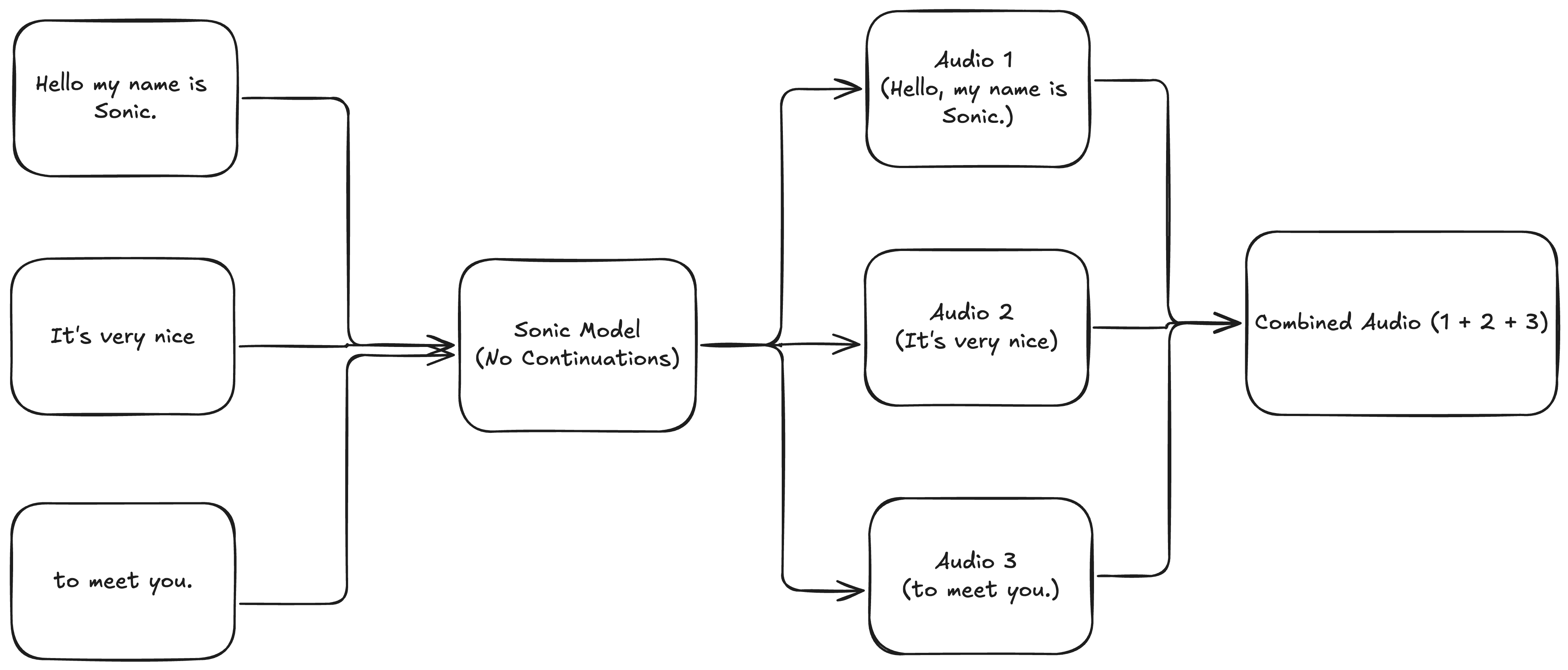
Let's say we're using an LLM and it generates a transcript in three parts, with a one second delay between each part:
1. `Hello, my name is Sonic.`
2. ` It's very nice`
3. ` to meet you.`
To generate speech for the whole transcript, we might think to generate speech for each part independently and stitch the audios together:
Unfortunately, we end up with speech that has sudden changes in prosody and strange pacing:
Your browser does not support the audio element.
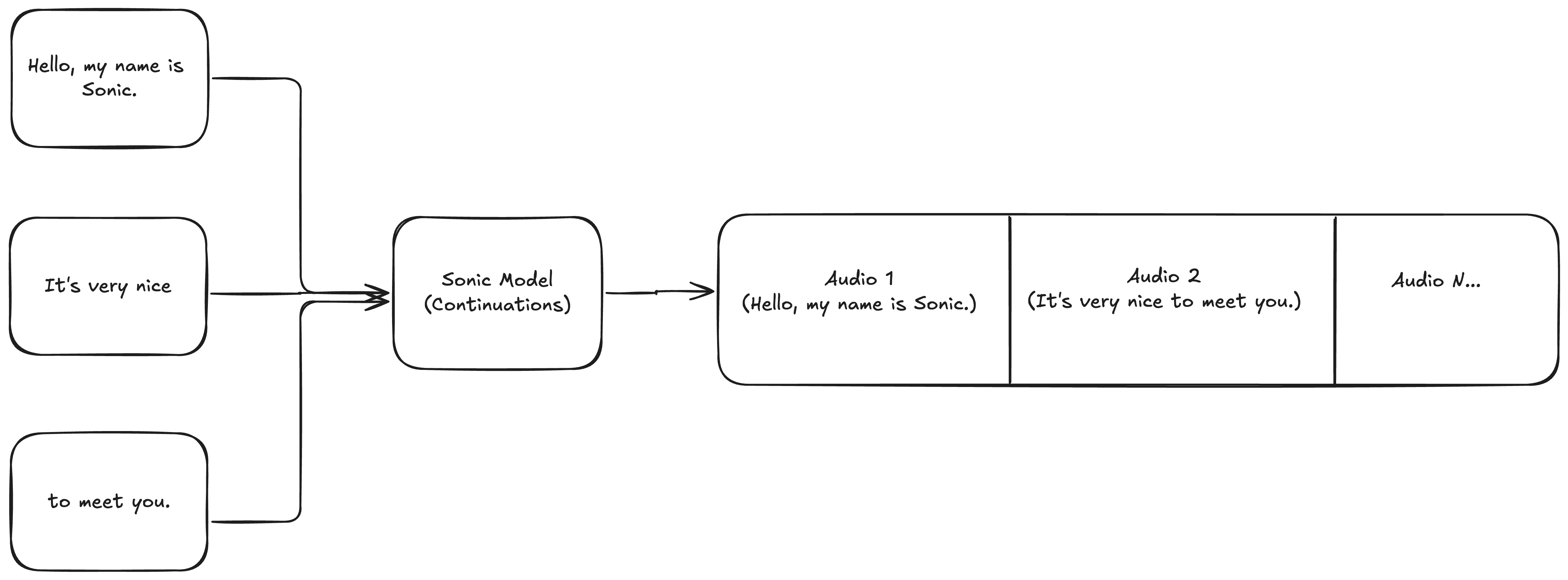
Now, let's try the same transcripts, but using continuations. The setup looks like this:
Here's what we get:
Your browser does not support the audio element.
As you can hear, this output sounds seamless and natural.
You can scale up continuations to any number of inputs. There is no limit.
## Caveat: Streamed inputs should form a valid transcript when joined
This means that `"Hello, world!"` can be followed by `" How are you?"` (note the leading space) but not `"How are you?"`, since when joined they form the invalid transcript `"Hello, world!How are you?"`.
In practice, this means you should maintain spacing and punctuation in your streamed inputs.
**End complete sentences with closing punctuation** (for example `.`, `?`, or `!`).
If a streamed chunk does not end with sentence-ending punctuation, the model often treats it as an incomplete sentence. That can cause:
* **Extra latency:** Text may stay in the automatic input buffer until the model sees a clearer boundary or until `max_buffer_delay_ms` elapses (**3000ms by default**), so audio starts later than you expect.
* **Audio artifacts:** The model expects natural sentence endings; without closing punctuation, the generated audio sometimes ends with odd or distorted sounds.
When a user-facing utterance is finished, put terminal punctuation on the final segment (and signal that no more text is coming on the context when appropriate, for example `no_more_inputs()` in the SDK or `continue: false` over the WebSocket).
## Automatic buffering with `max_buffer_delay_ms`
When streaming inputs from LLMs word-by-word or token-by-token, we buffer text until the optimal transcript length for our model. The default buffer is 3000ms, if you wish to modify this you can use the `max_buffer_delay_ms` parameter, though we *do not recommend making this change*.
If you plan on using `speed` or `volume` [SSML tags](/build-with-cartesia/capability-guides/ssml-tags) with buffering, make sure decimal values are not split up.
Submitting `1.0` as `1`, `.`, `0` will result in unintended failure modes.
### How it works
When set, the model will buffer incoming text chunks until it's confident it has enough context to generate high-quality speech, or the buffer delay elapses, whichever comes first.
Without this buffer, the model would immediately start generating with each input, which could result in choppy audio or unnatural prosody if inputs are very small (like single words or tokens).
### Configuration
* **Range**: Values between 0-5000ms are supported
* **Default**: 3000ms
Use this *only* if
* you have custom buffering client side, in which case you can set this to 0
* you have choppiness even at 3000ms, in which case you can try a higher value
```js lines theme={null}
// Example WebSocket request with `max_buffer_delay_ms`
{
"model_id": "sonic-3.5",
"transcript": "Hello", // First word/token
"voice": {
"mode": "id",
"id": "a0e99841-438c-4a64-b679-ae501e7d6091"
},
"context_id": "my-conversation-123",
"continue": true,
"max_buffer_delay_ms": 3000 // Buffer up to 3000ms
}
```
Let's try the following transcripts with continuations and the default `max_buffer_delay_ms=3000`: `['Hello', 'my name', 'is Sonic.', "It's ", 'very ', 'nice ', 'to ', 'meet ', 'you.']`
Your browser does not support the audio element.
## Where to go next
 Unfortunately, we end up with speech that has sudden changes in prosody and strange pacing:
 Here's what we get: