> ## Documentation Index
> Fetch the complete documentation index at: https://docs.cartesia.ai/llms.txt
> Use this file to discover all available pages before exploring further.
# Multilingual Voices
> Make a voice sound native in new languages and accents.
A voice can support one or more locales, defined by language and accent. A voice may sound less natural when used in a locale it does not support. For example, an American English voice used to generate Spanish will speak with an American accent.
## Localization
**Localization** adapts a voice to sound natural in a target locale while preserving the original speaker’s identity and character.
You can localize a voice to a different language, such as adapting an English voice to Spanish, or to a different accent, such as adapting an American English voice to British English.
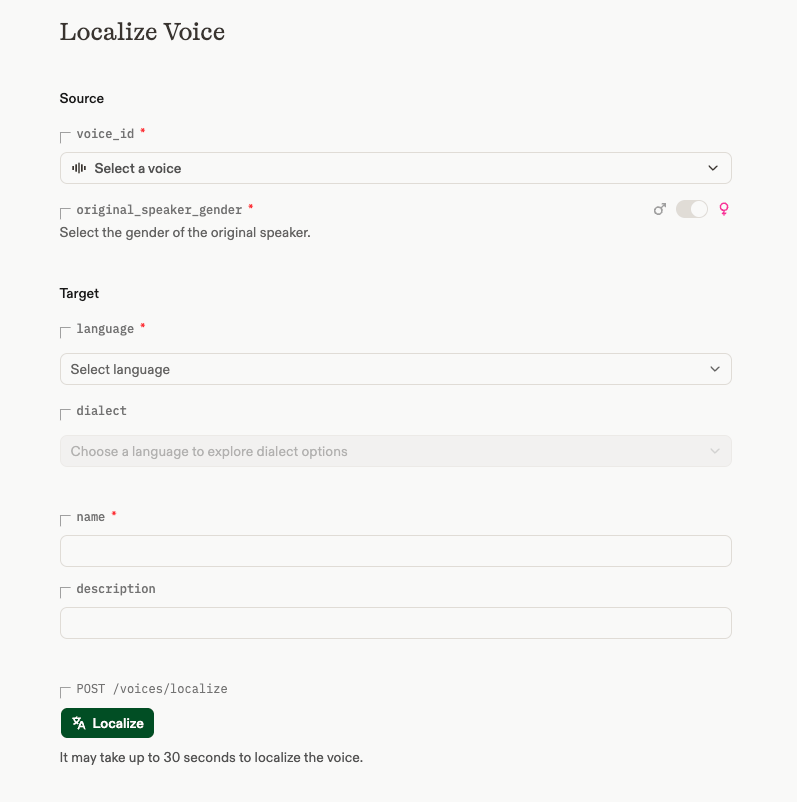
Localization is available in the [playground](https://play.cartesia.ai/voices/create/localize) and the [API](/api-reference/voices/localize). Provide the source voice, its gender, and the target language and accent. See the [API reference](/api-reference/voices/localize) for the full list of supported locales.
Localization currently creates a new voice with its own `voice_id`. We’re working to let you add more locales to an existing voice instead.
Localization works with voices in the [Voice Library](https://play.cartesia.ai/voices) and [Instant Voice Clones](/build-with-cartesia/capability-guides/clone-voices). It isn't supported for [Pro Voice Clones](/build-with-cartesia/capability-guides/clone-voices-pro).
 ## Voices that support multiple locales
Some featured voices support multiple locales through a single `voice_id`.
Set the `language` field to the locale you want the voice to speak. If you omit it, Cartesia will attempt to detect the language from the transcript. For more reliable language detection, avoid very short transcripts.
### Code-switching
For best results, use a single language per generation — for example, send separate API calls for "For English, press one" and "Para Español, marque dos".
**Code-switching** — using two languages in the same generation — works for languages where it's common, such as Hindi (Hinglish) and Tagalog (Taglish). Outside of those, code-switching may result in accented speech in one of the languages.
## Voices that support multiple locales
Some featured voices support multiple locales through a single `voice_id`.
Set the `language` field to the locale you want the voice to speak. If you omit it, Cartesia will attempt to detect the language from the transcript. For more reliable language detection, avoid very short transcripts.
### Code-switching
For best results, use a single language per generation — for example, send separate API calls for "For English, press one" and "Para Español, marque dos".
**Code-switching** — using two languages in the same generation — works for languages where it's common, such as Hindi (Hinglish) and Tagalog (Taglish). Outside of those, code-switching may result in accented speech in one of the languages.