> ## Documentation Index
> Fetch the complete documentation index at: https://docs.cartesia.ai/llms.txt
> Use this file to discover all available pages before exploring further.
# Control Speed and Emotion
> Learn how to control the speed and emotion of generated speech.
This feature has been deprecated. Please see [the changelog](/changelog/2025#april-2025) for details.
Speed and emotion controls are available through the [playground](https://play.cartesia.ai) and the API in the Text-to-Speech endpoints ([Bytes](/2024-11-13/api-reference/tts/bytes), [SSE](/2024-11-13/api-reference/tts/sse), and [WebSocket](/2024-11-13/api-reference/tts/websocket)).
**The effects of controls vary by voice and transcript.** If you find that the controls cause artifacts in the generated speech, try reducing their strength or reducing the number of controls you have applied.
## Playground
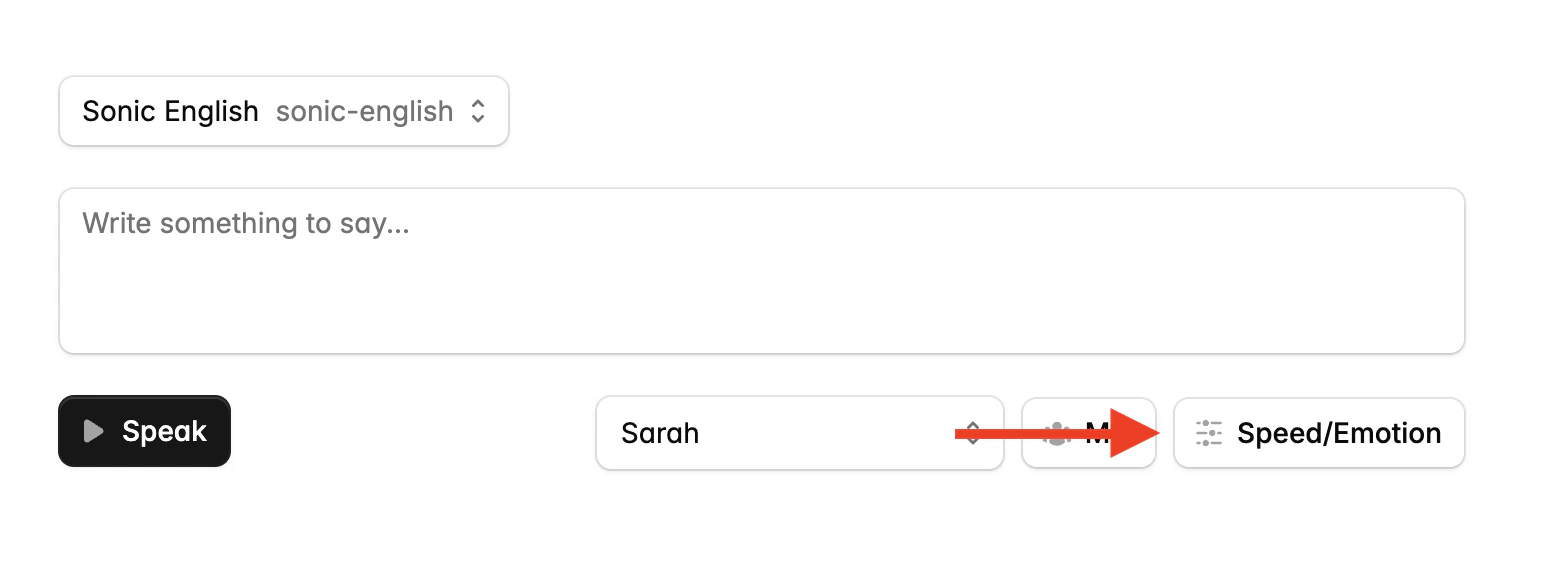
In the playground, you can access speed and emotion controls by clicking the "Speed/Emotion" button in the Text-to-Speech tab.
 ## API
This feature is currently experimental and is subject to breaking changes.
To use controls in the API, add the `__experimental_controls` dictionary to the `voice` object in your API request:
```json theme={null}
"voice": {
"mode": "id",
"id": "VOICE_ID",
"__experimental_controls": {
"speed": "normal",
"emotion": [
"positivity:high",
"curiosity"
]
}
}
```
### Speed Options
* `"slowest"`: Very slow speech
* `"slow"`: Slower than normal speech
* `"normal"`: Default speech rate
* `"fast"`: Faster than normal speech
* `"fastest"`: Very fast speech
For more granular control, you can define speed as a number within the range $[-1.0, 1.0]$. A value of 0 represents the default speed, while negative values slow down the speech and positive values speed it up.
```json Using a label theme={null}
"__experimental_controls": {
"speed": "fast"
}
```
```json Using a number theme={null}
"__experimental_controls": {
"speed": -0.1
}
```
### Emotion Options
The `emotion` parameter is an array of "tags" in the form `emotion_name:level`. For example, `positivity:high` or `curiosity`.
#### Emotion Names
* `anger`
* `positivity`
* `surprise`
* `sadness`
* `curiosity`
#### Emotion Levels
**Emotion controls are purely additive, they cannot reduce or remove emotions.** For example, `anger:low` will add a small amount of anger to the voice, not make the voice less angry.
* `lowest`
* `low`
* (omit level for moderate addition of the emotion)
* `high`
* `highest`
## API
This feature is currently experimental and is subject to breaking changes.
To use controls in the API, add the `__experimental_controls` dictionary to the `voice` object in your API request:
```json theme={null}
"voice": {
"mode": "id",
"id": "VOICE_ID",
"__experimental_controls": {
"speed": "normal",
"emotion": [
"positivity:high",
"curiosity"
]
}
}
```
### Speed Options
* `"slowest"`: Very slow speech
* `"slow"`: Slower than normal speech
* `"normal"`: Default speech rate
* `"fast"`: Faster than normal speech
* `"fastest"`: Very fast speech
For more granular control, you can define speed as a number within the range $[-1.0, 1.0]$. A value of 0 represents the default speed, while negative values slow down the speech and positive values speed it up.
```json Using a label theme={null}
"__experimental_controls": {
"speed": "fast"
}
```
```json Using a number theme={null}
"__experimental_controls": {
"speed": -0.1
}
```
### Emotion Options
The `emotion` parameter is an array of "tags" in the form `emotion_name:level`. For example, `positivity:high` or `curiosity`.
#### Emotion Names
* `anger`
* `positivity`
* `surprise`
* `sadness`
* `curiosity`
#### Emotion Levels
**Emotion controls are purely additive, they cannot reduce or remove emotions.** For example, `anger:low` will add a small amount of anger to the voice, not make the voice less angry.
* `lowest`
* `low`
* (omit level for moderate addition of the emotion)
* `high`
* `highest`